

Topic
Product version 21.10 and higher.
If proxy servers are in place, then kindly follow the instructions below for configuring clients.
Instructions
Use OS (internet option) setting for proxy server
-
Edit and save "C:\Program Files\Kryon Studio\Kryon.Studio.exe.config",
It looks like below originally:

a. Remove the attribute from line 39
b. Module child element
So now you will have only defaultproxy element like below:

.NET Framework should not use the proxy settings of Internet Explorer but a different one then add proxy element as below:
<proxy
autoDetect="True|False|Unspecified"
bypassonlocal="True|False|Unspecified"
proxyaddress="uriString"
scriptLocation="uriString"
usesystemdefault="True|False|Unspecified"
/>
This is how the file "C:\Program Files\Kryon Studio\Kryon.Studio.exe.config" will look like:
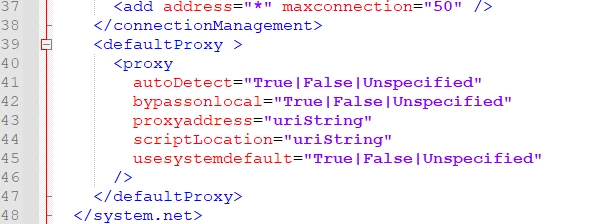
Kindly select the options as per your need in above attributes
Reference Article:
<defaultProxy> Element (Network Settings) - .NET Framework