




Topic
While running an email command from Studio or Console, if this error message is received: Failed. Something went wrong; this is a generic message from the email client that it cannot resolve the endpoint.
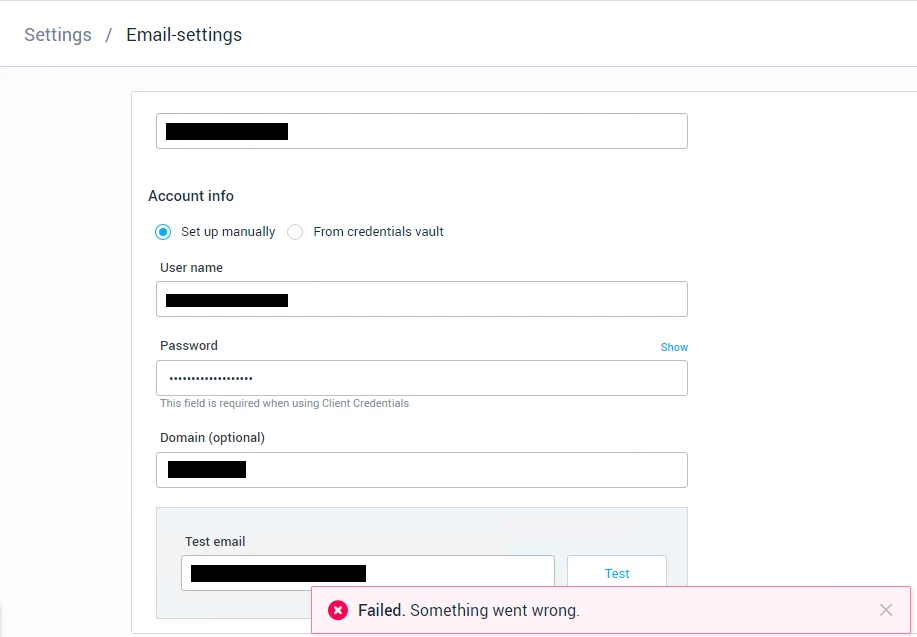
Troubleshooting
First, use the instructions below to pull the SEQ logs. When looking at the SEQ logs, the main error showing is:
error while acquiring ews token - ClientAuthError: endpoints_resolution_error: Error: could not resolve endpoints. Please check network and try again. Detail: ClientAuthError: openid_config_error: Could not retrieve endpoints. Check your authority and verify the well-known/openid-configuration endpoint returns the required endpoints. Attempted to retrieve endpoints from: …This error occurs when the OpenID config endpoint cannot be reached. In such cases, we would need the customer to inspect network traffic to determine why it failed, often due to a network connectivity issue.
Instructions
- Please discuss the above with your IT team. Usually, they will be able to resolve the issue with this information.
- After checking with your IT Team, if the issue persists, try to manually connect to the URL listed in the log error and report the result to your IT Team and Nintex Support.
- If using a proxy, send a screenshot of the machine proxy settings to Nintex Support. Issues with accessing external endpoints required for authentication with Office 365 Exchange can sometimes be related to proxy configurations.
- Check to see if the email advanced commands are working properly from Studio.
- Are the email triggers behaving correctly in the Console?
- Are there any specific errors?
- If the issue is not resolved with the above, please send an email to Nintex Support, with the information and screenshots from above and we will troubleshoot further.
Additional Information
For more information on Email Commands, see this link: