



Topic
At times, there are tasks stuck in Console under 'Running' status which cannot be removed or cancelled. You will need to remove these tasks using by running a SQL query in SSMS (SQL Server Management Studio)
Instructions
- Access the DB for Nintex/Kryon RPA using SSMS
- Identify all tasks in the tasks.tasks_task_data table in Kryon database that has not been completed using the following query
SELECT * FROM tasks.tasks_task_data WHERE end_execution_time IS NULL
- Identify the id of the task to clear from the Currently Running status and update the is deleted to value 1 using the following query
UPDATE tasks.tasks_task_data SET is_deleted = 1 WHERE id = '<id>'
After that, clear the Redis cache using the following:
- Run P3X Redis UI from Kryon\Services\Kryon.cache\client
- Launch the tool after completing the download. You should be greeted with the following screen
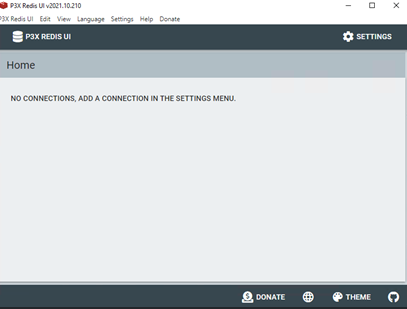
- Click on Settings and then New Connection to add a new connection

- For RPA 22.x >> Provide a unique name and update the hostname of the server to 127.0.0.1, and port 6379. Password will be Kryon2022! However, if not working, please try with Kryon2021! And Kryon123!
- For RPA 24.x >> Please check Environment variable for password. Variable name is Cache_Auth
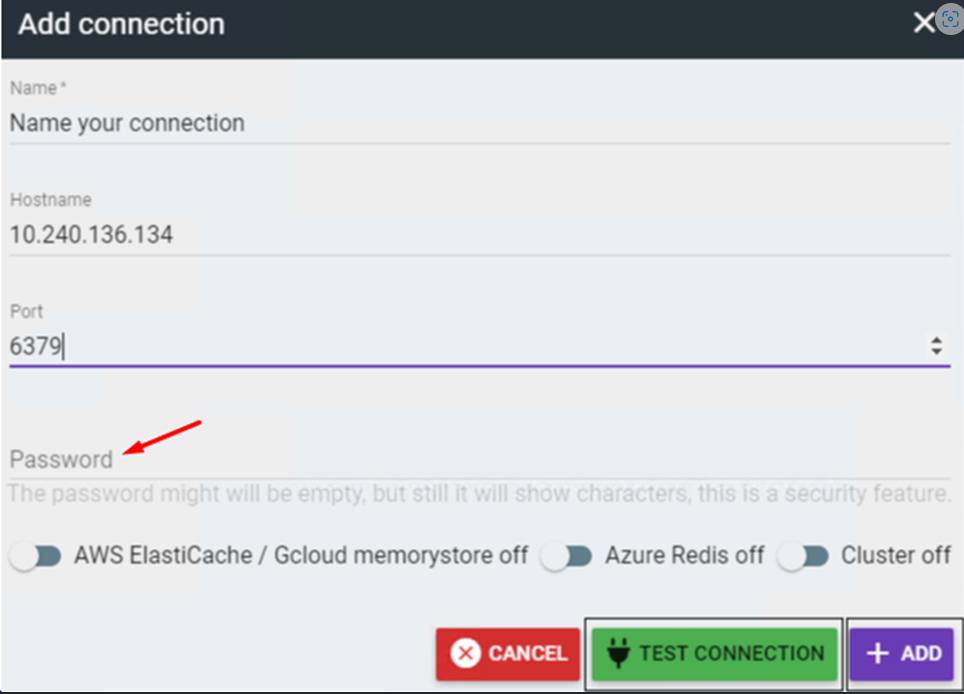
- Click Test Connection. You should see that Redis is connected successfully. Click Add to create the new connection
- With the new connection created, click on the Connect button on the bottom left and select the connection that has just been created
- Mouse over on the Kryon folder in the left pane and a red 'x' should appear. Click on the red 'x' to delete it
- After that, restart all RPA services, and the task should be removed.