




Product: Kryon RPA
Product Version: All
Components: Kryon Console
In this article you will learn how variables can be passed to an unattended robot as part of a task’s execution. This feature is useful if certain variables are specific to a particular execution of a task. For example, the FROM amount and currency pair in a wizard that converts a currency amount from one to another.
Prerequisites:- The robot should configured to operate in unattended mode and registered with Kryon Console.
Steps: Variables can be passed to a task via two methods:
- Via the Add automation task to queue advanced command.
- Via a trigger or scheduled task in the Kryon Console.
The Add Automation Task to Queue Advanced Command
Under the "Parameters" tab we can add all variables along with their values.
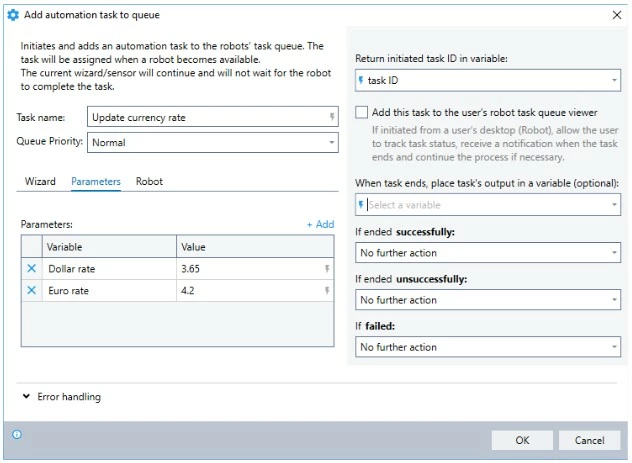
When Task A executes the command above, a new Task B will be created with the variables included and sent to the console’s Task Queue. The task will be executed as normal when a robot is available.
Via a trigger of scheduled task in the Kryon Console
In Kryon Console, when defining a task within Triggers or the Scheduler you will find 3 tabs:
- General
- Variables
- Notifications
You can add variables and their values in the "Variables" tab. An example from the Triggers section is shown below.
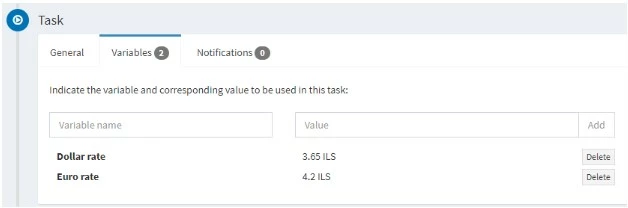
When the trigger or scheduled task is run, the variables and their values will be available for use through the usual dollar ($x$) notation.