




Introduction to Kryon licensing
In order to use the Kryon RPA platform, we need a license file. The process for generating the license file is handled by the Kryon RPA sales contact. In most cases, the license file requires activation via the Internet. However, if your Kryon Application Server does not have readily available internet access, you can be provided a license file that does not require internet activation.
In this document we will be learning how to activate your Kryon RPA license via the Internet.
How to install Kryon license
Once you receive a license file – Kryon License - {Company Name}.llk – from your Kryon RPA sales contact save the file to a location from which you can easily access it on the Kryon Application Server, then follow these steps to activate it in Kryon Admin:
1. Login to Kryon Admin using your credentials (you need your user to have Permission Manager rights)
2. In the Menu Pane click Companies and Users
3. Select the company for which you are activating the license
4. Select the Licensing tab
5. Click Activate License
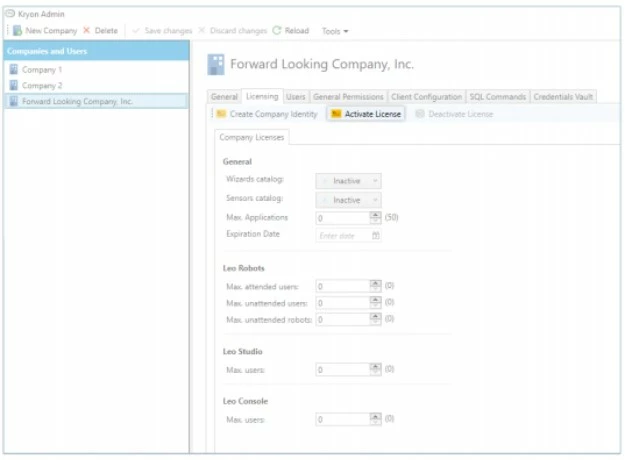
6. From the dialog box that opens, select the option to Import from file, click Browse and navigate to the license file you saved
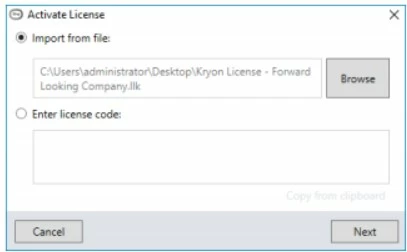
7. Click Next
8. Click Activate
9. You will receive a message that activation was successful, and all the relevant details of the license (expiration date, maximum number of users for platform components, etc.) will be automatically populated
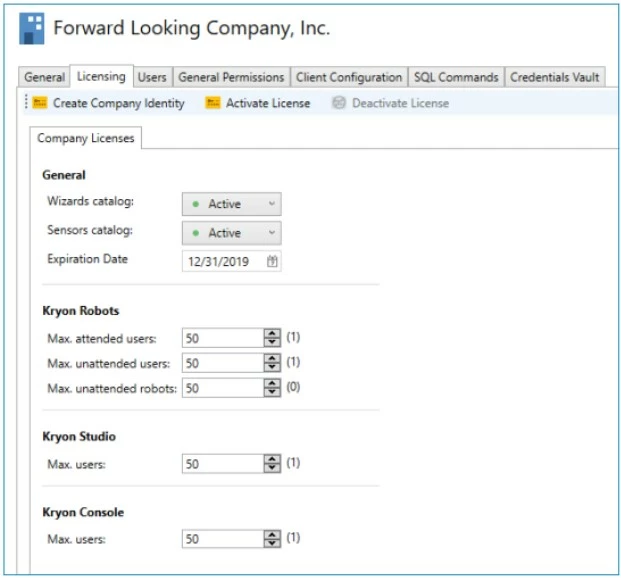
10. Click Save changes.