Nintex Community Menu Bar
Solved

Document Approval Process

  • February 12, 2026
  • 2 replies
  • 18 views

Forum|alt.badge.img+1

Hi there,


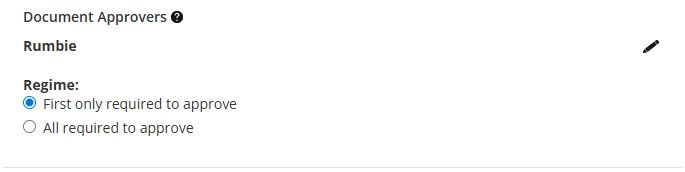
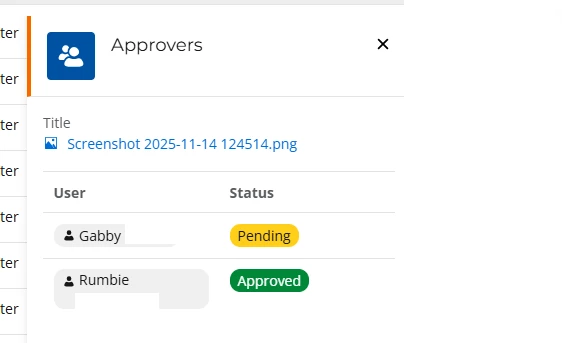
I need assistance with this one ASAP. How does the document approval work? We have people uploading new documents (images) and it says that it requires multiple peoples approval. However the group stakeholders say the Document approvers are only one of these people. The dashboard notification for myself also says awaiting your approval but I am not on the approval list?

Thanks in advance.

Best answer by EvgeniosE

The reason you are seeing that the document is awaiting your approval is because you are most likely a Promaster. This notification is added as a safeguard in case the document approvers are not available. If document approvers are defined, the Promasters are not shown on the list to keep things more streamlined.

Regarding why Gabby is shown even though she is not specified as a Document Approver, I am not sure. From what I can see from your screenshot, you are at a top level Folder (i.e. there is no inheriting document approvers from a higher level folder). I would suggest raising with the support@nintex.com, so we could have a closer look at exactly what the set-up is for that document/folder

2 replies

Forum|alt.badge.img+9
  • Nintex Employee
  • Answer
  • February 16, 2026

The reason you are seeing that the document is awaiting your approval is because you are most likely a Promaster. This notification is added as a safeguard in case the document approvers are not available. If document approvers are defined, the Promasters are not shown on the list to keep things more streamlined.

Regarding why Gabby is shown even though she is not specified as a Document Approver, I am not sure. From what I can see from your screenshot, you are at a top level Folder (i.e. there is no inheriting document approvers from a higher level folder). I would suggest raising with the support@nintex.com, so we could have a closer look at exactly what the set-up is for that document/folder


Forum|alt.badge.img+1
  • Author
  • Rookie
  • February 17, 2026

The reason you are seeing that the document is awaiting your approval is because you are most likely a Promaster. This notification is added as a safeguard in case the document approvers are not available. If document approvers are defined, the Promasters are not shown on the list to keep things more streamlined.

Regarding why Gabby is shown even though she is not specified as a Document Approver, I am not sure. From what I can see from your screenshot, you are at a top level Folder (i.e. there is no inheriting document approvers) from a higher level folder. I would suggest raising with the support@nintex.com, so we could have a closer look at exactly what the set-up is for that document/folder

thank you for your help. we have disabled document approval as we have reassessed that it is not needed for us. If this problem occurs with process approval I will send an email to support but has not so far, thanks again!