

Topic
How can I use policy mode in Nintex Promapp?
Policy mode, if enabled, can be used to make it clear to users when they are looking at a policy rather than a procedure to be followed. The process map and associated roles are not displayed in this mode. Enabling policy mode is limited to Promasters only.
Instructions - Enable Policy Mode
-
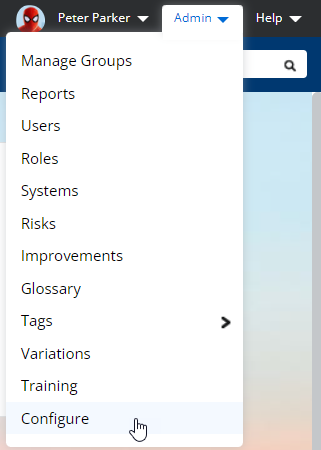
Select Admin > Configure.
-
Expand the Process Editing section.
-
Set Enable process 'Policy' mode to ON.

Instructions - Use Policy Mode
-
Select a process.
-
Click Edit.
-
Click Summary.
-
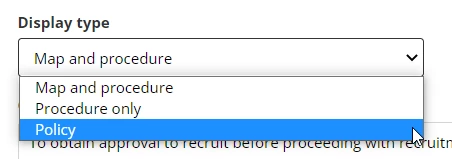
Select Policy from the Display type drop-down menu.
-
Click Save.
-
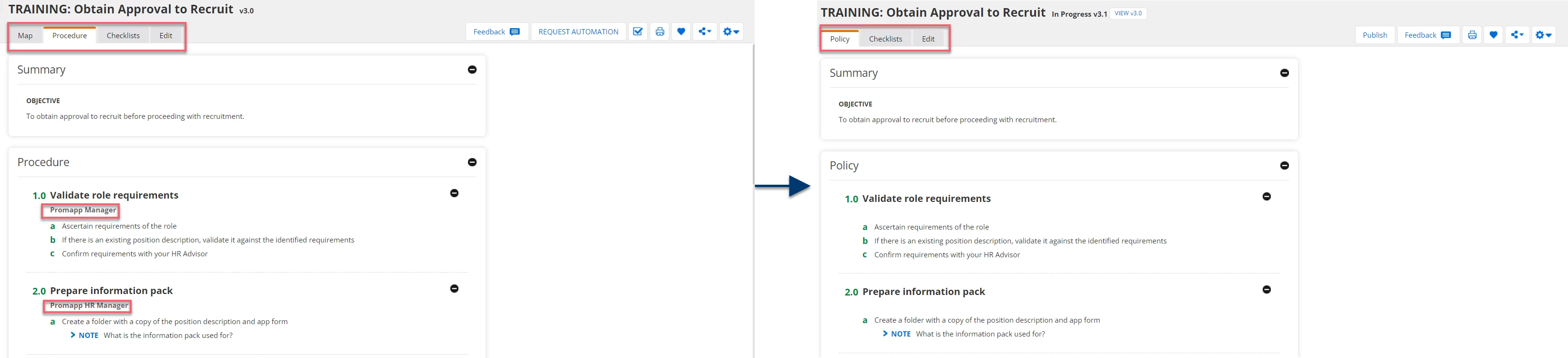
The selected process updates to reflect the display type change.
-
Policy mode:
-
Hides the Map tab
-
Renames the Procedure tab to Policy tab
-
Hides any associated role information
-
-
Additional Information
Enabling policy mode is limited to Promasters only.