




Topic
This will show you how to Archive then fully Delete a Process in Nintex Promapp
Instructions
1. Navigate to the Process you are trying to remove
2. Select the Cog wheel on the top right hand corner of your page and select "Archive"

3. Select the "Home" icon on your Processes tab
4. Select "Archived"
5. Find the Process you want to delete and Select the Trash Icon
6. Select "Yes" in the Popup
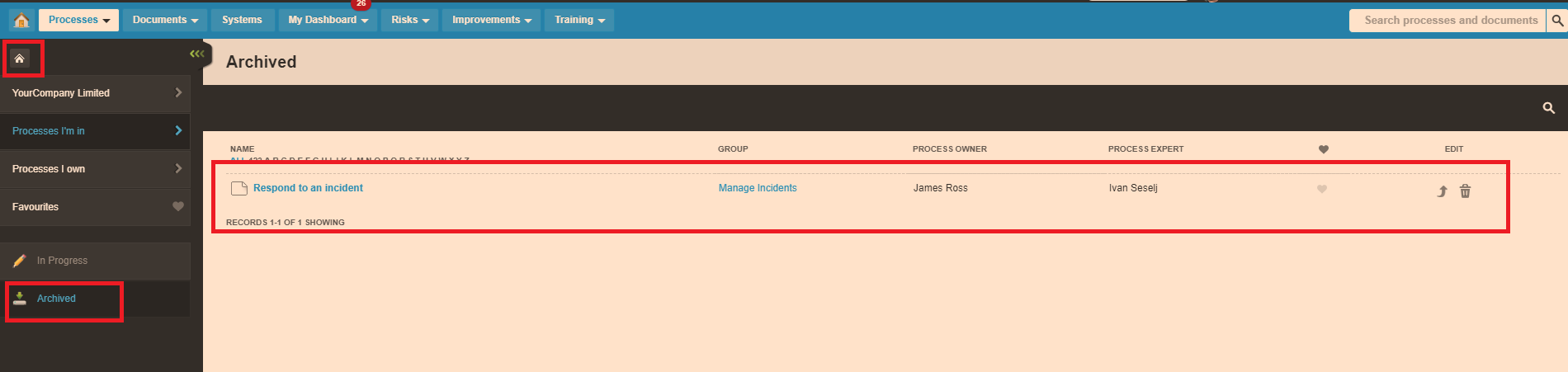
2. Select the Cog wheel on the top right hand corner of your page and select "Archive"
3. Select the "Home" icon on your Processes tab
4. Select "Archived"
5. Find the Process you want to delete and Select the Trash Icon
6. Select "Yes" in the Popup
Additional Information
You may get an error when trying to Archive. Here's documentation on how to resolve - Nintex Promapp Process cannot be Archived
You can restore the Processes in your Archived folder by selecting the "Up" arrow next to the Trash Icon
Only Promasters have access to the Archived Section
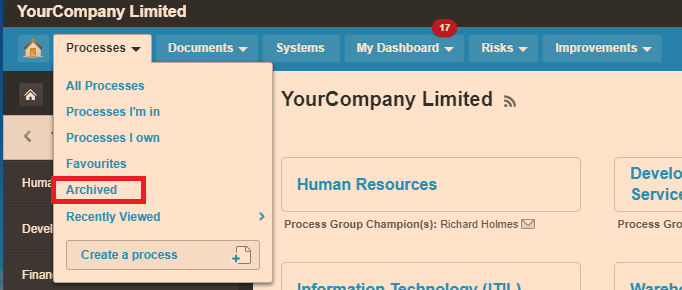
Promasters can see Archived Processes in the drop down created from the Processes button (see below)
You can restore the Processes in your Archived folder by selecting the "Up" arrow next to the Trash Icon
Only Promasters have access to the Archived Section
Promasters can see Archived Processes in the drop down created from the Processes button (see below)
Related Links