Topic
After upgrading Nintex SSO, refer to this article:
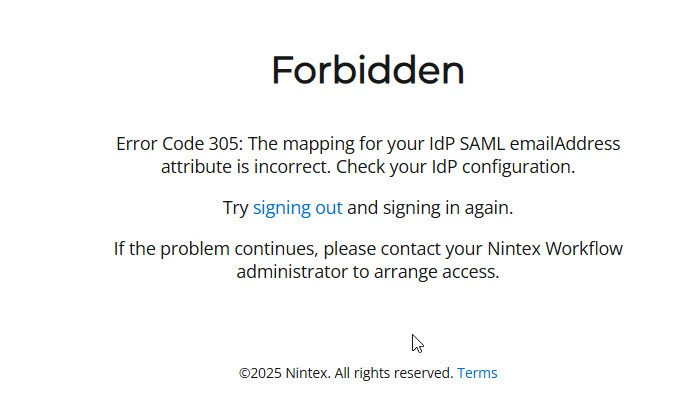
The user is unable to log in with the following error message shown:
Instructions
1. Navigate to Entra SAML Single Sign On for the Nintex Workflow (NAC) and click on Attribute and Claims (Edit):

2. Click on each line of the Additional Claim Names (the one that is highlighted red below):
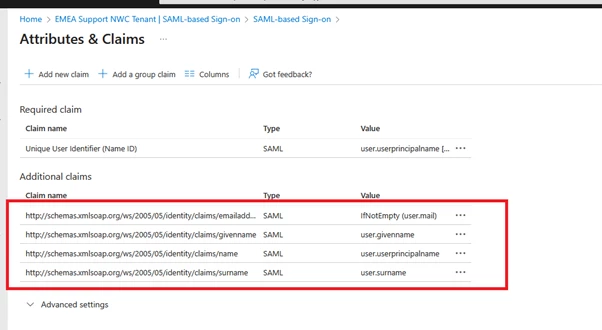
3. Verify it has the value as per the following:
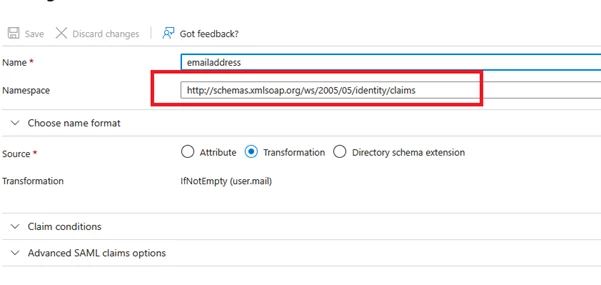
Name: emailaddress
Namespace: http://schemas.xmlsoap.org/ws/2005/05/identity/claims
Name: givenname
Namespace: http://schemas.xmlsoap.org/ws/2005/05/identity/claims
Name: name
Namespace: http://schemas.xmlsoap.org/ws/2005/05/identity/claims
Name: surname
Namespace: http://schemas.xmlsoap.org/ws/2005/05/identity/claims
All the values in the Namespace must be only : http://schemas.xmlsoap.org/ws/2005/05/identity/claims
Make sure the rest of the 3 attributes also has the same values: