

Hi there Nintex Community,
I have a trial tenant for Nintex Workflow Cloud.and used the Nintex Gallery JS-Insert installation steps to register the plugin in my Nintex Automation Cloud tenant using plugin hosted at
https://ashleypresalesfunctions.blob.core.windows.net/nac-plugins/js-insert.js
I was then able to drag the JS-Insert control onto my Nintex form start event form, however when I select the JS-Insert control I only see a single line element to enter the in the JS to Execute field as below:
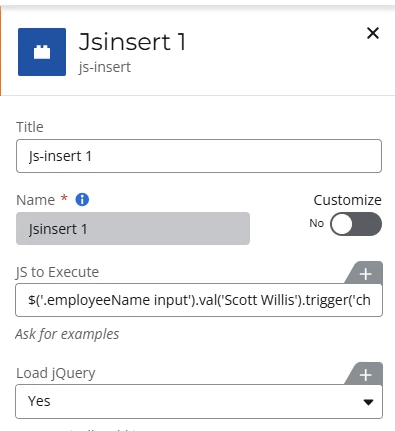
These posts indicate multiple lines of JS are possible.
JS-Insert Functions to Execute | Community
Examples of JS-Insert usage | Community
Is this a limitation of the hosted plugin I am using at “https://ashleypresalesfunctions...”?
I also downloaded the template js-insert.zip file and tried to “Add plugin” and select the downloded js-insert.js file, but that generated an error “Failed to load the plugin definition”
Does anyone know if this js-insert plugin supports multiple line JavaScript?



