


Hi Team,
I have been struggling to find a suitable way to ‘generate’ a unique form code for ‘booking number’ or a dedicated ‘reference number’ when requested by stakeholders/customers.
At first - needing to leverage another system to do a count (SharePoint Online) to provide a number in the line and using format date, did work BUT if someone else submitted a form before you the count number was used and therefore would not be unique causing some duplication. The way to combat that was to enforce a unique field validation on the associated SharePoint column (i.e Title / Booking Number). This kind of worked but would cause the Nintex workflow to FAIL as SharePoint would say no.
Instead of making the simple form and workflow complex (could add a Loop N and delay etc) i opted for another way which I think worked a treat especially as i needed to display the Booking Number on the form and have it throughout the process for emails and such. This was a pain point to start with as the original code , would display one thing but then by the time the email triggered because of the formatting, the Booking Number changed.
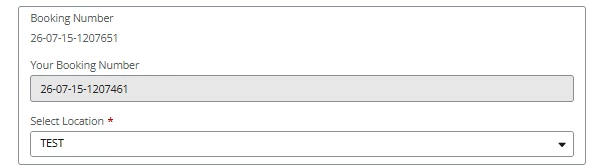
My Solution was this
Add a text Field - read only
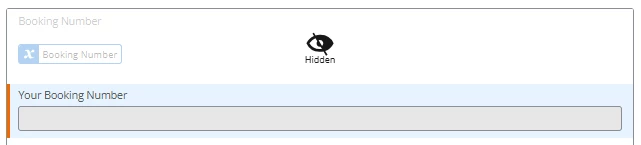
Then create a rule to populate that text
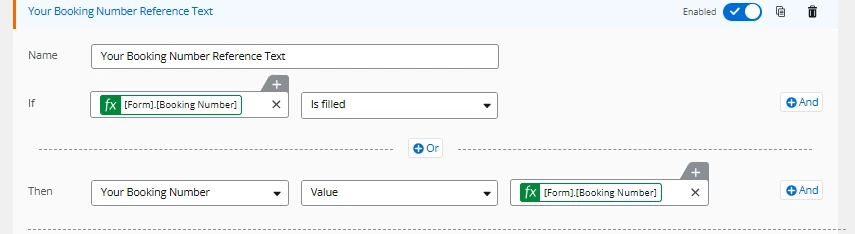
Now the ‘Booking Number’ variable was created by building this
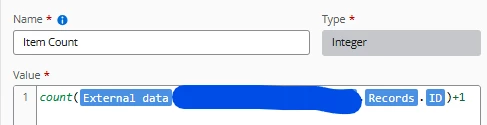
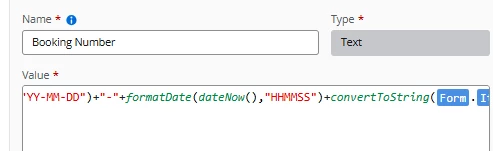
formatDate(dateNow(),"YY-MM-DD")+"-"+formatDate(dateNow(),"HHMMSS")+convertToString([Form].[Item Count])
After a few attempts I had to add in the HHMMSS to make sure it was unique otherwise multiple attempts if using
formatDate(dateNow(),"YY-MM-DD")+"-"+convertToString([Form].[Item Count])
would mean the issue of duplicate would occur if the count did not update should 2 people use the form at the same time.
So NOW by referencing the text field that populates the first time and capture using that and not the variable, SPO and emails should by consisent
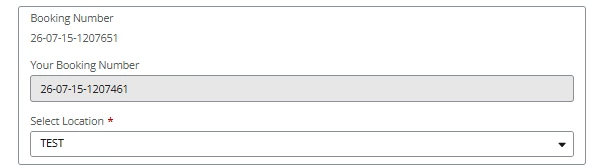
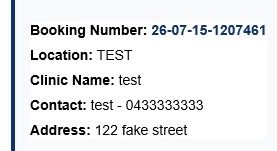

Has anyone else run into this Or has a similar or better way to build bespoke sequences in Nintex Automation Cloud?


