Nintex Community Menu Bar
Question

Save forms and offline availability

  • November 26, 2025
  • 17 replies
  • 73 views

Forum|alt.badge.img+2

Hi

I am using the Nintex Workflow Cloud platform to develop a form which is long and may take a few months to complete. 

I have explored the option of saving the form each time part of it is completed but the form needs to be completed in 30 days which isn’t possible for what is is intended for. Could this period be extended? If yes by how long? 

I have also explored the option of having the form offline but I can’t seem to find the option to enable form “Availability offline” from the form properties. I am using QA Nintex Workflow Cloud to test the workflow and then recreate in prod when it’s working okay. Please could you advise on how I can get the form offline. 

Also, how else can I configure the form to give me the ability to complete it over a long period of time. 

Thanks

 

17 replies

SimonMuntz
Nintex Employee
Forum|alt.badge.img+23
  • Nintex Employee
  • November 27, 2025

Hi ​@Sunita,

Welcome to the community.
Completing the form sounds like a task.
As this is the case, I would create a task using a task form and loop over it repeatedly, updating the form accordingly.
The loop would finish when a checkbox or similar on the form advises that the form is complete.
Workflows in Nintex Workflow can run for 1 year.


Forum|alt.badge.img+2
  • Author
  • Rookie
  • November 27, 2025

Hi ​@Sunita,

Welcome to the community.
Completing the form sounds like a task.
As this is the case, I would create a task using a task form and loop over it repeatedly, updating the form accordingly.
The loop would finish when a checkbox or similar on the form advises that the form is complete.
Workflows in Nintex Workflow can run for 1 year.

Hi Simon

Thank you.

So I take it the 30day deadline can't be extended? How about the offline availability?


SimonMuntz
Nintex Employee
Forum|alt.badge.img+23
  • Nintex Employee
  • November 27, 2025

Hi ​@Sunita,

No, draft forms cannot be extended passed 30 days.
As Nintex Workflow is SaaS-based, there is no such thing as an offline version.


Forum|alt.badge.img+2
  • Author
  • Rookie
  • November 27, 2025

Thanks Simon


The intension is not to have the entire work flow offline. Just the form. Nintex has information on how to enable offline availability for forms, but I can't find the settings.  


SimonMuntz
Nintex Employee
Forum|alt.badge.img+23
  • Nintex Employee
  • November 27, 2025

Hi ​@Sunita,

The only offline ability for Nintex Workflow is when the Nintex Mobile application is being used.
The issue here is that when the app goes online, the form will submit.


Forum|alt.badge.img+2
  • Author
  • Rookie
  • November 27, 2025

We intend to keep the form offline until it is completed before we go online. Yes, I came across information that the nintex mobile map will be used if I am to go offline. I have ticked the box saying the form will be used in the nintex mobile app. The next thing I needed to do was enable the offline availability by clicking the form to open form properties. Which I haven't found yet even after clicking the "edge" of the form to open the form properties.  


SimonMuntz
Nintex Employee
Forum|alt.badge.img+23
  • Nintex Employee
  • November 27, 2025

@Sunita,

How about creating a table in Nintex Workflow to collect the data?
You use a table form to update/edit and add to the data. When the time comes, you run a workflow on the table Item.
The table item never expires and nor will the form.


Forum|alt.badge.img+2
  • Author
  • Rookie
  • November 30, 2025

Hi Simon

Thanks for the above. With the table, will that be the initiating event that needs to be completed to start the workflow? I explore the option as well. 

Please could you advise on the offline availability as I still think this would be our best option.  I understand this only works in the nintex mobile app which isnt a problem. However in the course of development,  I need to configure the form to be available offline in the nintex mobile app which is where I am stuck. I can't find the form properties in the nintex workflow cloud platform I am using. Information on your site says I need to enable offline availability via form properties. I have followed the steps of clicking the edges of the form to bring up form properties but the form properties wasnt displayed. Please could you direct me on how to find form properties on the nintex workflowcloud, that way I can enable offline availability. Thanks


SimonMuntz
Nintex Employee
Forum|alt.badge.img+23
  • Nintex Employee
  • November 30, 2025

Hi ​@Sunita,

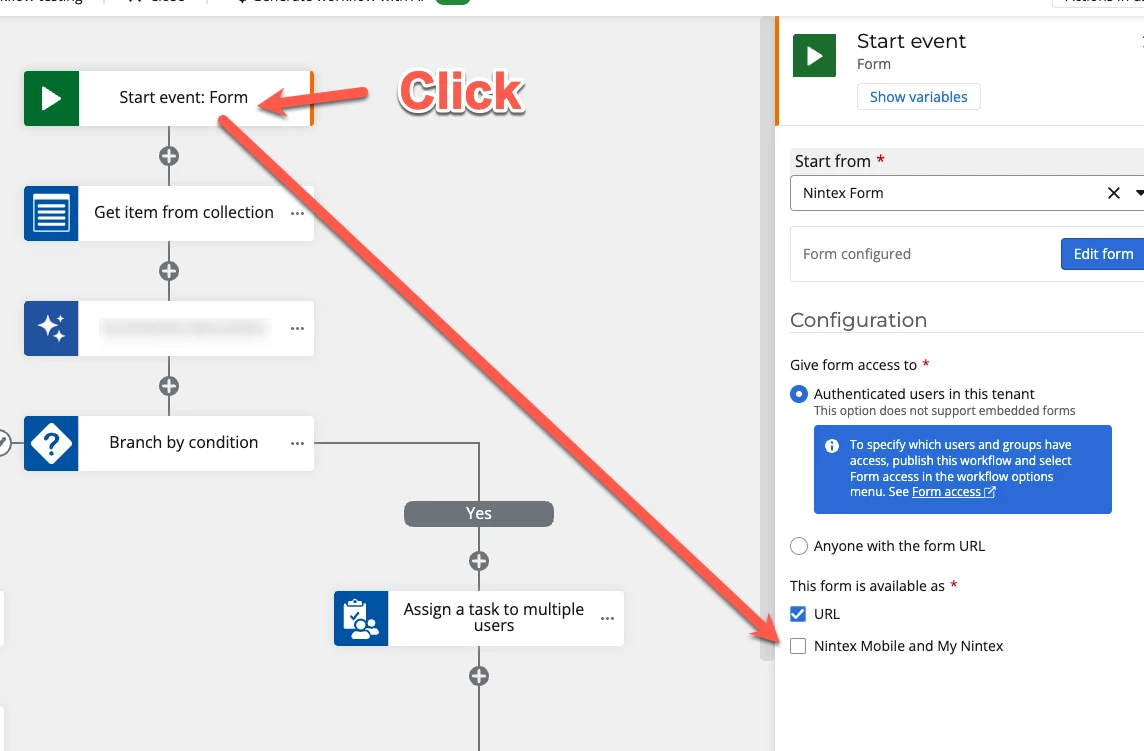
For a form to appear in Nintex Mobile, the option needs to be checked.
The option is not enabled from the form designer;  it is enabled from the form start event.


Forum|alt.badge.img+2
  • Author
  • Rookie
  • December 1, 2025

Hi Simon, 

I have done the above already.

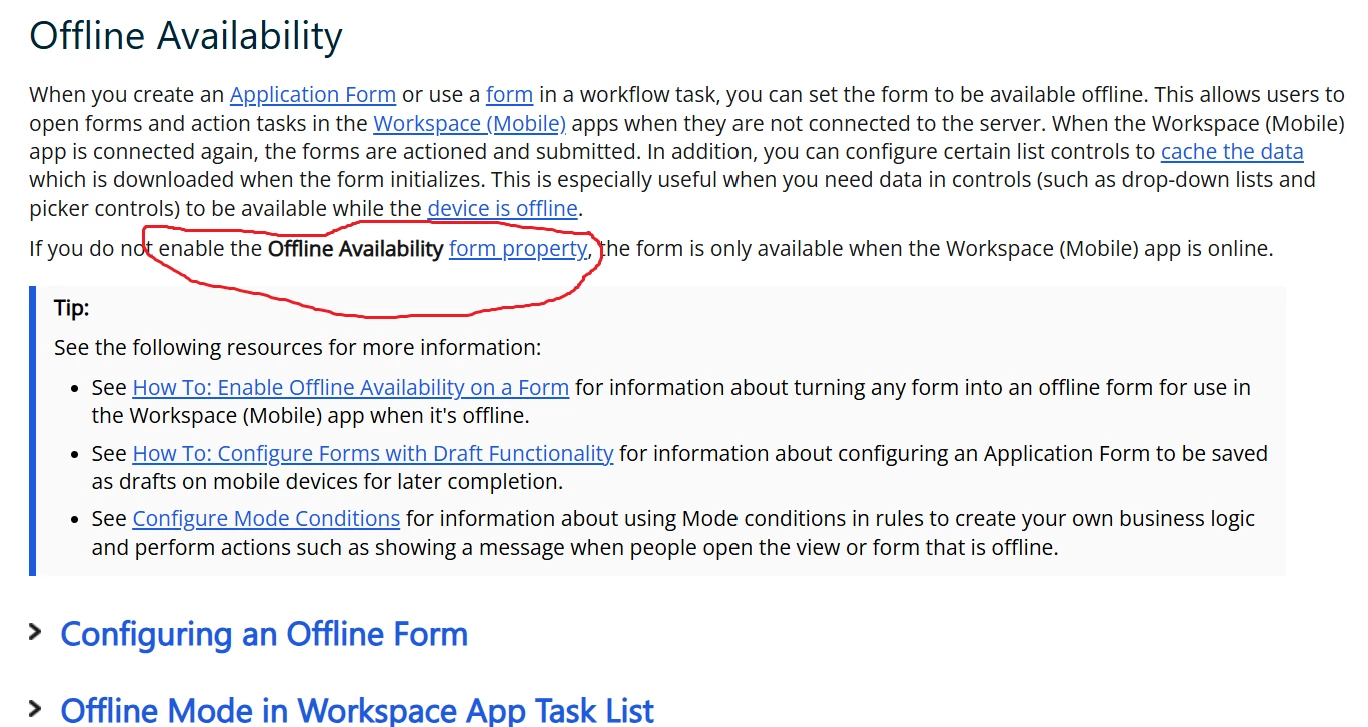
The next step is to enable offline availability via form property (See below) but I have been unable to find form property even after following the advised steps. Thanks


SimonMuntz
Nintex Employee
Forum|alt.badge.img+23
  • Nintex Employee
  • December 1, 2025

Hi ​@Sunita,

The screenshot of the help file provided appears to be from K2 Cloud: https://help.nintex.com/en-US/k2cloud/userguide/update_19/Content/Create/Forms/OfflineAvailability.htm

You have posted in the Nintex Workflow section of the forum.
Which product are you using?


Forum|alt.badge.img+2
  • Author
  • Rookie
  • December 1, 2025

I am using the Nintex Workflow cloud. Doesn't the help file apply to Nintex workflow cloud as well? If no can you please advice? Thanks


SimonMuntz
Nintex Employee
Forum|alt.badge.img+23
  • Nintex Employee
  • December 1, 2025

Hi ​@Sunita,

No K2 cloud is an entirely different product.
The help files for Nintex Workflow are here.
Nintex Workflow does not have offline form availability, except when connecting Nintex Mobile to the Nintex Workflow tenant.


Forum|alt.badge.img+2
  • Author
  • Rookie
  • December 1, 2025

Hi Simon


Thanks for clarifying. With regards to connecting nintex mobile to the nintex workflow tenant, how does that work? Is that a connection done during development?  Or is it enabling nintex mobile and my nintex? Which I have done already.


Also in your first reply to my query, you suggested “As this is the case, I would create a task using a task form and loop over it repeatedly, updating the form accordingly
The loop would finish when a checkbox or similar on the form advises that the form is complete.”


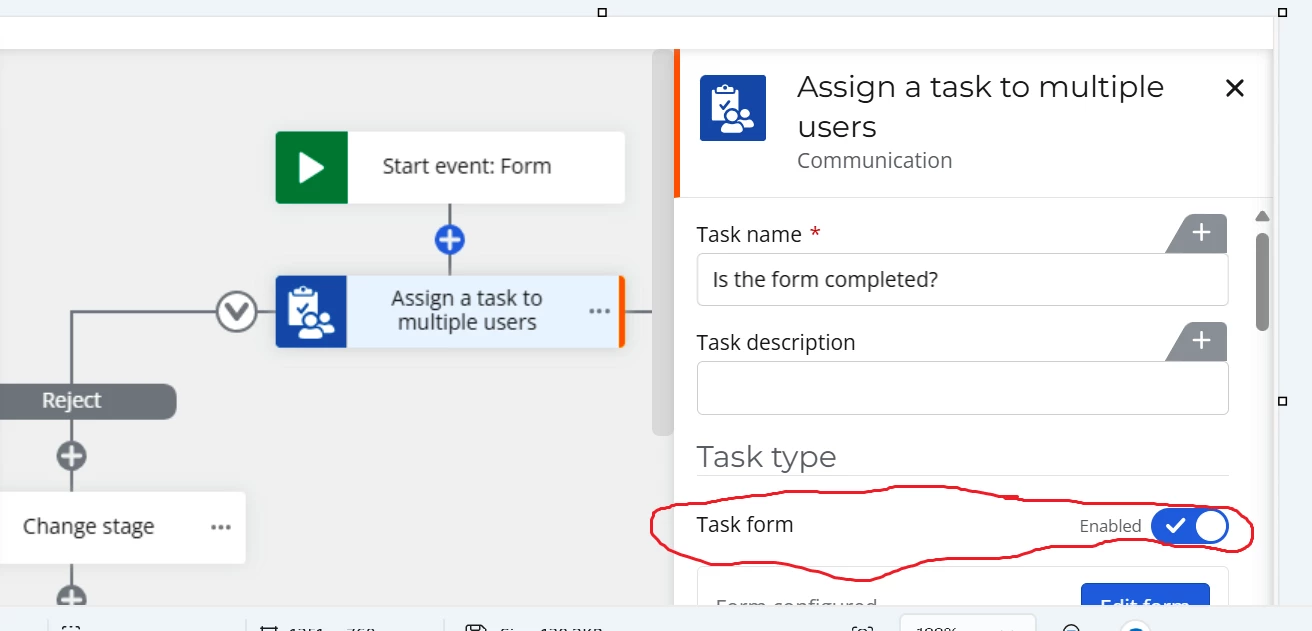
Is the task form different from the nintex start event form? Because within the “assign a task to multiple users” below there is the task form encircle in red. (see below). I am not sure if that is the task form you were referring to. Thanks


SimonMuntz
Nintex Employee
Forum|alt.badge.img+23
  • Nintex Employee
  • December 1, 2025

Hi ​@Sunita,

To see Nintex Workflow start forms and task forms in Nintex Mobile, a user just needs:

  1. Download the app. 
  2. As the app can be used for several Nintex products, a user needs to select Nintex Workflow.
  3. Enter their credentials.

Any form that has a check box to show in the app will appear in the forms section of the app.
Any task assigned to the user will show in the task section of the app.

Yes, Task forms are different to start event forms. In saying that, data can be passed from a start form to a task form.


Forum|alt.badge.img+2
  • Author
  • Rookie
  • December 1, 2025

Thanks Simon, so where is the task form selected from?  


SimonMuntz
Nintex Employee
Forum|alt.badge.img+23
  • Nintex Employee
  • December 1, 2025

Hi ​@Sunita,

Task forms can be accessed via a link on the task email, My Nintex, or the Nintex Mobile app.