Nintex Community Menu Bar
Question

Read PDF Files from Sharepoint Folders

  • June 4, 2026
  • 5 replies
  • 24 views

Forum|alt.badge.img+1

Hi Community,

We have a workflow that generates a PDF agreement and sends it for e-signature using Nintex AssureSign.

Once the document has been signed, the workflow stores the signed PDF agreement in a SharePoint folder structure organized by Customer ID and the current date.

We now need to submit the signed PDF agreement for government stamping. As part of this process, the workflow needs to retrieve the signed PDF from the SharePoint folder. We have tried using the Get a File and Query a List actions; however, the workflow is unable to locate or read the signed PDF from the destination SharePoint folder.

Could you please advise on the recommended approach for retrieving a signed PDF file from a SharePoint document library when the folder path is dynamically generated based on Customer ID and date?

Any guidance, best practices, or sample configurations would be greatly appreciated.

Thank you in advance for your assistance.

Liy Liy

5 replies

Simon Muntz
Nintex Partner
Forum|alt.badge.img+23
  • Nintex Partner
  • June 4, 2026

Hi ​@Sim Liy Liy,

Is this one or two workflows? One that generates the PDF and stores it, and one that submits the PDF to the government?

If it’s one workflow, you can use the file variable that is storing the generated PDF to send to the government.

If it’s a separate Workflow and you need to find the file in SharePoint, make sure that the credentials being used in the query or get file actions have permissions to access the file.


Forum|alt.badge.img+1
  • Author
  • Nintex Partner
  • June 5, 2026

Hi Simon,

It is a separate workflow. In other words, the second workflow is intended to locate the signed PDF file in SharePoint.

We have tried using the Get a file and Query a list actions. However, the workflow is still unable to locate or read the signed PDF from the destination SharePoint folder.

The required permissions have already been granted.

Could you please advise the correct approach or recommended action to retrieve the signed PDF from the SharePoint folder?

Liy Liy


Simon Muntz
Nintex Partner
Forum|alt.badge.img+23
  • Nintex Partner
  • June 5, 2026

Hi ​@Sim Liy Liy,

It sounds like you are already doing the right thing.
If you did not know the Item ID or the URL path, then yes, you would first need to query the library to find the file.
Once found, you would use the Get a File action to retrieve the file by ID.

If the file can’t be found, then it’s either permissions or an issue with the query. Check that the account being used in the SharePoint connection (not the account running the workflow) has permissions on the file.


Forum|alt.badge.img+1
  • Author
  • Nintex Partner
  • June 5, 2026


Hi Simon,

The required permissions have already been granted.

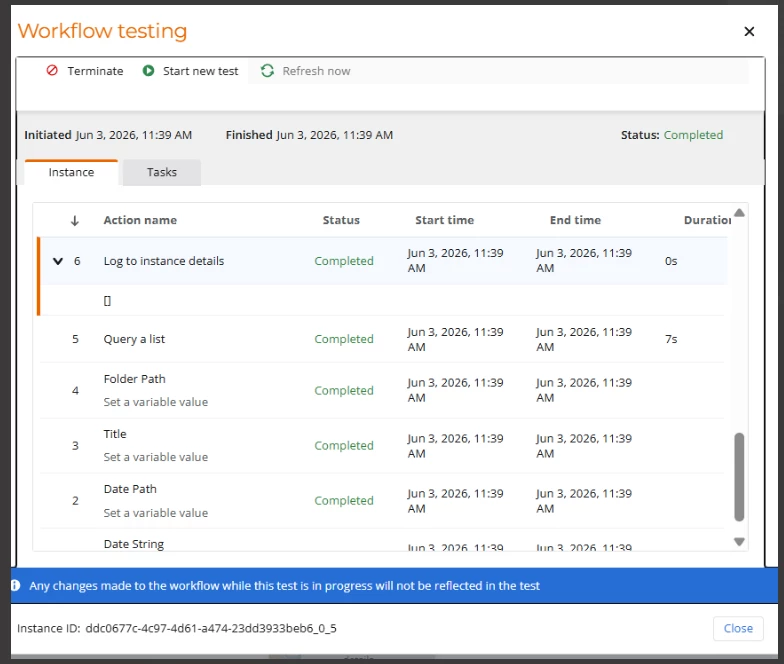
Please refer to the screenshot attached. After the Query a List action is executed, the Log to Instance Details action is returning an empty string. Based on the workflow execution, it appears that no value is being returned from the query.

We are currently unsure why the workflow is unable to retrieve the file information and are stuck at this stage.


Thanks

Liy Liy


Simon Muntz
Nintex Partner
Forum|alt.badge.img+23
  • Nintex Partner
  • June 5, 2026

Hi ​@Sim Liy Liy,

If you are certain that permissions are correct, then you need to look at your query.
Remove any conditions on your query action to make sure that it can return items from the library.