Nintex Community Menu Bar
Solved

How to merge files in NWC workflow from Form attachments?

  • April 14, 2020
  • 14 replies
  • 421 views
  • Translate All

Forum|alt.badge.img+9

The users are filling an Input start Form on NWC with attachments. 

we want to generate a PDF into document template from the filled form and append the attachments provided on the form to the generated PDF as one document before sending it to the users to approve. 

We are able to use docgen to generate the pdf from the form data. But can someone help and explain how can we merge the attachment files? detailed steps will be appreciated..  new to NWC. 


Thank you!
Best answer by leighburke

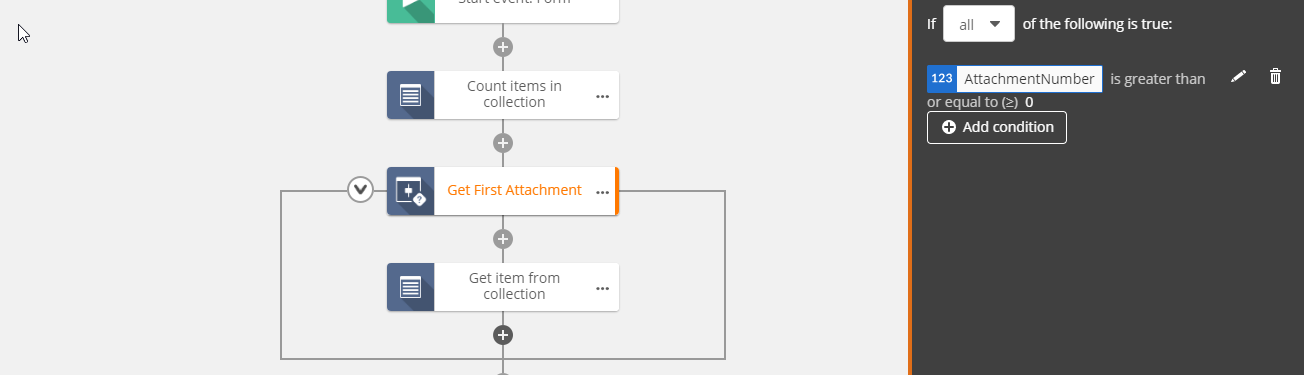
@cmikhaiel_e So you will need to count the number of files, then conditionally extract the files from the collection by checking against the number of files(See Below). You will then need use the same condition to include the file in your document generation. Here is an export key for a quick sample(RKJsQWzLjz8fp5DWWSCXARPDBeqPcw4dGTmKtzyyPvfTnbtbt), you would add a condition up to the maximum number of files.


View original

14 replies

Forum|alt.badge.img+14
  • Nintex Employee
  • April 15, 2020

@cmikhaiel_eDo you know how many attachments there will be?

Translate

Forum|alt.badge.img+9
No, but they shouldn't be too many attachments, probably 2-5 attachments.
Translate

Forum|alt.badge.img+14
  • Nintex Employee
  • Answer
  • April 15, 2020

@cmikhaiel_e So you will need to count the number of files, then conditionally extract the files from the collection by checking against the number of files(See Below). You will then need use the same condition to include the file in your document generation. Here is an export key for a quick sample(RKJsQWzLjz8fp5DWWSCXARPDBeqPcw4dGTmKtzyyPvfTnbtbt), you would add a condition up to the maximum number of files.


Translate

Forum|alt.badge.img+4
@leighburke, can you elaborate more on how to merge the attachments to the form created. I am using a loop action to gather all my attachments, but I don't follow how to attach that to the document template I created for my form.
Translate

Forum|alt.badge.img+14
  • Nintex Employee
  • June 16, 2020

@kbarton Here is the workflow again, so you can see my example I made(RKJsQWzLjz8fp5DWWSCXARPDBeqPcw4dGTmKtzyyPvfTnbtbt). You get each file out of the collection and put it in it's own variable. Those are then conditionally merged if they exist in the Document Generation action. 

Translate

Forum|alt.badge.img+4
Thanks @leighburke. I didn't see that option when I was playing around before. So basically you count the collection to see how many attachments you have. Would have to assume a set number in order to populate the template though right?
Translate

Forum|alt.badge.img+14
  • Nintex Employee
  • June 17, 2020

@kbarton you need to know the maximum number of files, you can also make the file being merged conditional on the collection count.

Translate

Forum|alt.badge.img+4
@leighburke, works perfectly. Thanks for explaining and the example.
Translate

  • August 25, 2020

@leighburke can you please send your workflow key, I am unable to open the workflow using the key in the tread. 

I am trying to merge several pdfs users will be attaching in the form as one document and then place a signature in that attached document package. 


Thanks in advance for your help!

Translate

WouterT
Forum|alt.badge.img+9
  • Apprentice
  • August 31, 2020

@leighburke I am interested in this solution. But what do these shared export keys mean? (khEHTFjQaiyYCHdNs7MoYNPSMMFZK7fdqy13GkzUp1SV2gkLr)  How does this bring me to the sample workflow?

Translate

Forum|alt.badge.img+14
  • Nintex Employee
  • August 31, 2020

Hi @WouterT,


I have changed the export link to the following(RKJsQWzLjz8fp5DWWSCXARPDBeqPcw4dGTmKtzyyPvfTnbtbt), we have a nice video explaining how to import and export workflows(https://www.youtube.com/watch?v=fC2SDnQHEvE).


Translate

WouterT
Forum|alt.badge.img+9
  • Apprentice
  • August 31, 2020

Thanks @leighburke for your quick reply! I am going to study this for sure. Wasn't aware of this feature. I asked this actually in the context of this SharePoint Online List Attachment problem I just posted here. 

Translate

EleanorK
Forum|alt.badge.img+1

Hi @leighburke ,


I have created the WF as per your imported version. I have allowed for up to 10 files but when I tested the WF the instance failed with the message being " ! Index was outside the bounds of the collection". Looks like it failed at attempting to check for attachment number 9 and the form only had 8 attachments? The run if actions were configured like yours with the index being greater than a certain number?


Translate

Forum|alt.badge.img+14
  • Nintex Employee
  • September 7, 2020

@EleanorK That error looks like the 'run if' ran when it shouldn't I would check the condition and confirm the collection size using a log in details. Keeping in mind the last index value will be 1 less than the count because collections start at 0.

Translate