Solution showcase: Learn how to use Nintex CE Platform
I have a field that is part of a repeating section within my form. The field is a Test - Short field and is set to read-only. By default, the background color is gray. I would like to change the background color to white.
How would I accomplish this using CSS?
Best answer by cgwtamu1
I couldn’t get either Sasan’s or Simon’s suggestion to work. However, I found this article: How to change a read only textarea's background color. and the following worked.
.whiteinput input[readonly] {
    background-color: white !important;
    }
@cgwtamu1 the following resources may of you help to you:
https://help.nintex.com/en-US/nwc/Content/Designer/CustomCSSGuidelines.htm
Hi @cgwtamu1,So, adding onto what Sasan is advising.
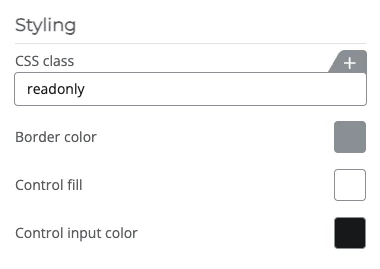
If you gave the control the CSS class name of “readonly” your CSS would look like this:
[dir] .nx-theme-styles .nx-theme-form .readonly .nx-theme-input-1 {
  background-color: #ffffff;
}
Hi @cgwtamu1,Great to hear that you found a solution.I did test my code before posting, so strange it did not work for you.
I’m new to Nintex so I’m sure I did something incorrectly.
Already have an account? Login
Enter your E-mail address. We'll send you an e-mail with instructions to reset your password.