I’m trying to generate a text variable with a custom date.
I can’t use “Format date from String”: none of the built-in “Format” options match what I need.
I’d prefer NOT to use a form (this will be a component workflow, invoked from an external app), so I’m not sure this documentation applies:
https://help.nintex.com/en-us/nwc/content/designer/Functions/formatDate.htm
This is EXACTLY what I’m looking for: yyMMddHHss:
I’m trying to use fn-FormatDate({Workflow:Current Date and Time},"yyMMddHHmm") in “Set Variable”.
It’s printing out “fn-FormatDate(...)” instead of executing the inline function:
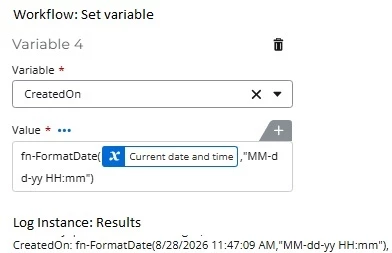
Q: What am I missing???
BACKGROUND:
What brought the question up is that I was trying to do several SMALL tasks that I THOUGHT were “trivially simple”: a) format a custom date string (this question), b) generate a random number, c) create a text file formatted with embedded newlines, d) etc. etc.
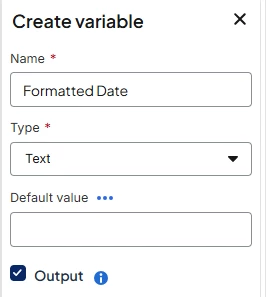
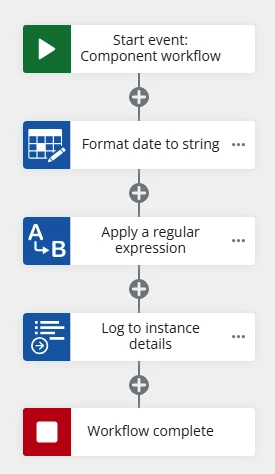
I found this “workaround” for the custom date string:
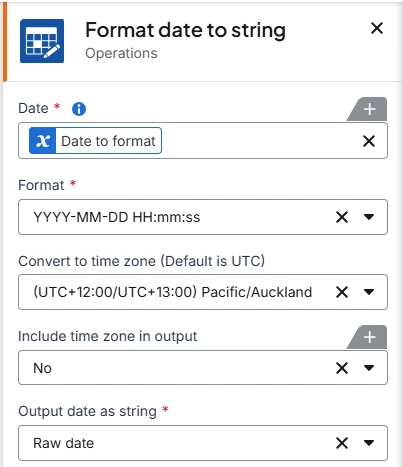
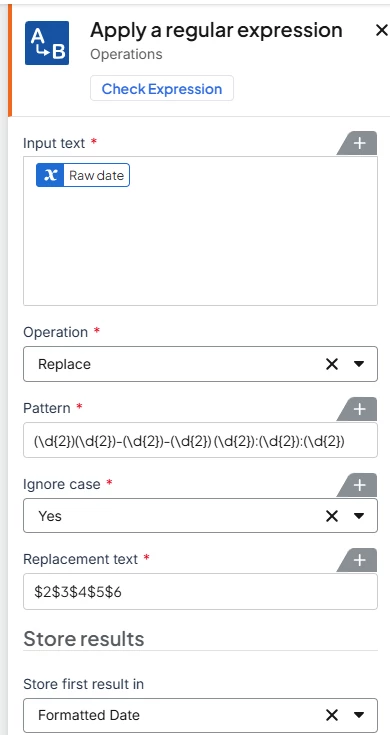
1. Call Format Date Time with one of the built-in formats
2. Apply a regex to change it to the format I need
<= But I’d prefer to call one inline function instead of invoking two separate actions...
But I’d still like to know:
Q1: is there a built-in “fn-FormatDate()” function, and how do I call it in an NWC action?
GENERAL QUESTION:
Our solution is deployed as an NAC-G workflow in a secure environment. For the most part, we CANNOT call any custom web services.
Q2: Is there ANY way to create “custom code” in an NAC-G workflow that DOESN’T rely on an external, 3rd party web service?
<= Is it possible to write “custom code” - in any language: C#, Java, PowerShell, JavaScript, Python, etc. etc. - and somehow “embed” it with the workflow?