Nintex Community Menu Bar
Solved

Get a display name or email from a list query

  • Nov 15, 2023 10:44 PM UTC
  • 6 replies
  • 471 views
  • Translate All

Forum|alt.badge.img+9

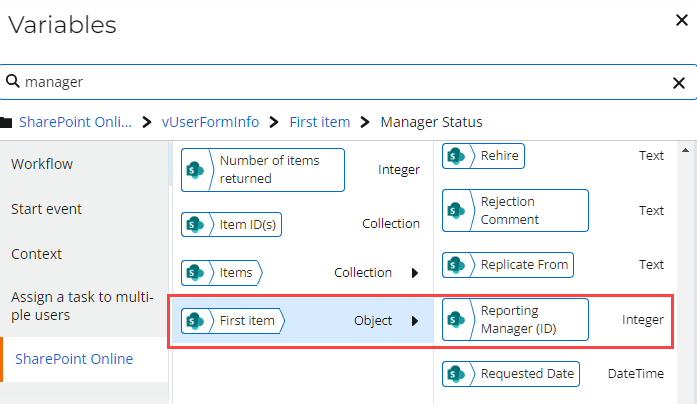
When I use a Query a List control the people column value on SharePoint is returned as an integer (ID). How do I turn it into a display name or an email? What does this integer represent? 
 

Best answer by Deon

@igorsp , I would say it is because the column is configured in SP to allow People and Groups.
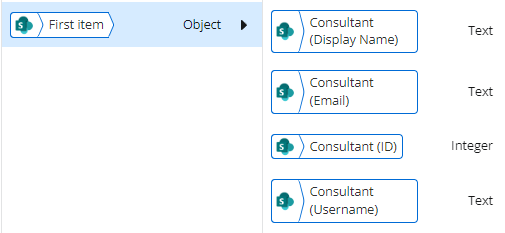
If it is configured with People Only and Allow multiple No, you will see the People Field broken down like this:


View original

6 replies

Forum|alt.badge.img+15
  • Nintex Partner
  • Nov 15, 2023 11:12 PM UTC

This happens when you pick users and groups.... you can only pick users in sharepoint person or group field when setting up that field. 

Translate

Deon
Forum|alt.badge.img+10
  • Rookie
  • Answer
  • Nov 15, 2023 11:14 PM UTC

@igorsp , I would say it is because the column is configured in SP to allow People and Groups.
If it is configured with People Only and Allow multiple No, you will see the People Field broken down like this:


Translate

Forum|alt.badge.img+1
  • Novice
  • Jan 29, 2024 6:43 PM UTC

What about when you need to select an office 365 group, what do you do then?

@Deon @brandiwoodson 

Translate

Deon
Forum|alt.badge.img+10
  • Rookie
  • Jan 30, 2024 1:33 AM UTC

@jr123456 ,


have you looked at these actions?


Translate

Forum|alt.badge.img+1
  • Novice
  • Jan 30, 2024 2:51 AM UTC

@Deon Can I input the ID of a 365 Group outputted from the Query a List action or how do you get a particular group?

Translate

Deon
Forum|alt.badge.img+10
  • Rookie
  • Jan 30, 2024 3:17 AM UTC

@jr123456 , it seems there are now so many different types of Groups in Azure and SharePoint.


The ID returned from the List people and group column is integer, but Microsoft 365 Groups has a GUID as an ID. It seems that when you USE a Microsoft 365 Group in the people and group column, SharePoint will create a dummy group with an integer id under the site groups, but you can’t get to that via the REST API, it doesn’t even come back when you ask for all Site Groups and when you make a REST API call to get members using the integer ID, you get:


{
"error": {
"code": "-2146232832, Microsoft.SharePoint.SPException",
"message": {
"lang": "en-US",
"value": "Group cannot be found."
}
}
}


May I ask if the groups you are interested in is:

  1. Under Microsoft 365 Admin Center
    • Teams & Microsoft 365 Groups?
    • Distribution List?
    • Security Group?
  2. Under Site Permissions - Site Group (i.e. a SharePoint Group)

The groups you see in 1. above are also in AAD so that is another option.

Translate