Nintex Community Menu Bar

Form based Task Approval

  • October 7, 2021
  • 3 replies
  • 139 views
  • Translate All

Hi, 


I've built an initial form in NWC for our field based staff to complete, its a series of labels with multi choice fields in a group which require a client approval upon completion. 


I am using a task approval form and would like the group from the initial form containing the labels and multi choice to be shown on the task approval so the client can approve/reject it. 


I cant see the group on any of the controls within listed in the start event form variables. 


Can anyone advise how I would get these to pull through please?


Apologies if this is a really dumb question - I'm a newbie when it comes to Nintex. 


Also once the client has approved / rejected it am I able to update the initial form with their response?


Thanks 


Stacey 

3 replies

Forum|alt.badge.img+14
  • Nintex Employee
  • October 7, 2021

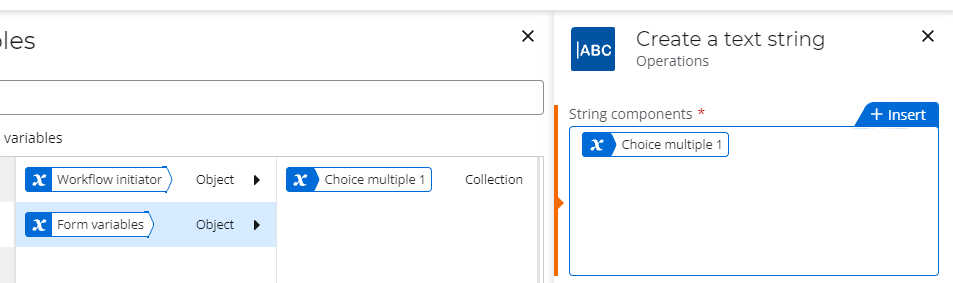
@StaceyLee Multiple choice fields return a collection variable, which is not directly available in later forms. A quick workaround is turning the collection in a text variable using the create a string(https://help.nintex.com/en-US/nwc/Content/Designer/Actions/CreateaTextString.htm). If you don't like how it looks you could also modify that string(https://help.nintex.com/en-US/nwc/Content/Designer/Actions/ModifyString.htm).

Once a form has been submitted there is no way to update that form. You could potentially use something like SharePoint to track the value change.

Translate

Hi


Many thanks for your response, I will give that a go today. 


Is there a way to even include the approved/rejected field within the original form one the client has approved/rejected the task form?


Thanks

Translate

Forum|alt.badge.img+14
  • Nintex Employee
  • October 11, 2021

There is currently no way to update a completed Form, you could suggest this on the uservoice(https://nintex.uservoice.com/). Here is some other potential options:

  • You could use a SharePoint list to track as mentioned
  • Have a new form to display the detail
  • Use document generation to put all the detail in one document
Translate