Nintex Community Menu Bar
Question

Can I specify time without date in Workflow Form?

  • September 24, 2026
  • 4 replies
  • 11 views

Forum|alt.badge.img+2

I want the form user to enter time-of-day on and off times, so I am not interested in the date component, just the time, including hours and minutes.

There doesn’t seem to be a way to turn off date (just time) in the DateTime control and the alternative solution I started to develop looked like it was going to be very clunky (choice or number control for the hour, number for the minutes, parse that out with a formula, validate the hours and minutes are 0-12, 0-60...etc) 

Worst case, I’ll provide instructions to select today’s date and the time, then will parse it out after submittal.

Is there a more elegant way to gather this info, though? Thanks in advance!
4 replies

Forum|alt.badge.img+11
  • Nintex Employee
  • September 24, 2026

Hi ​@Chris Wheeldon,

You could potentially do something using the Advanced Styles option and Custom CSS to hide the calendar that pops up for the selection for the DateTime control.  Then setting the default for the control to date now would set it as todays date with the current time so you have the correct day on it.  You’d still have to parse it on the WF side for just the time but it’d be a cleaner selection than the choice or number controls.


Forum|alt.badge.img+2

​@brent_read  thanks for that suggestion! I wondered if I would have to do something “custom” like that but wasn’t sure where to start.

The workflow side isn’t an issue - I can use regex or something, since the users won’t need see it.


Forum|alt.badge.img+11
  • Nintex Employee
  • September 24, 2026

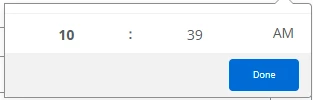
I spun it up real quick and added timeOnly as the CSS class to the control to get it to only show the time.  This is what I used:
 

.timeOnly div.flatpickr-innerContainer {visibility: collapse;height: 0px;}
.timeOnly div.flatpickr-month {visibility: hidden;height: 0px;}
.timeOnly .flatpickr-action-today {visibility: hidden;}


That makes the picker appear as:
 

You’d probably also want to do some formatting on the dateTime control itself, but that should get you started.


Forum|alt.badge.img+2

Hey, thanks, ​@brent_read! I don’t have much experience with CSS at all, so really appreciate you giving me this starting point. I’ve got a bunch of other adjustments to make elsewhere in my flow and will try this out once those are stable.