




ISSUE
Nintex Workflow and/or Forms license is not valid after upgrading When upgrading either Nintex Forms for SharePoint 2010 or SharePoint 2013
ERROR CODE
Your license is not valid for this version of Nintex Forms 20XX. Please contact sales@nintex.com to obtain a new license.
Your license is not valid for version X.X.X.X of Nintex Workflows 20XX. Please contact sales@nintex.com to obtain a new license
RESOLUTION
- Ensure that the license has Software Assurance as it is required to upgrade versions.
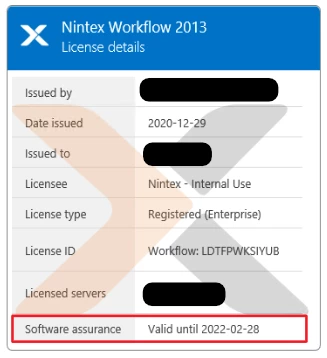
- If Nintex Forms is not on a version later than 1.9.0.0 (2010) or 2.7.0.0 (2013), the license may not be compatible. To update to a later version:
- Import a Standard (.nlf) license into your SharePoint environment. For more information, see Import and export licenses.
- Update Nintex Workflow and Forms
- After the upgrade has completed, import the the previous license again.
Note: To obtain a Standard Nintex Forms license, email sales@nintex.com for a trial license file.