Nintex Community Menu Bar
Question

Integrating Holiday calendar into Nintex form

  • April 6, 2026
  • 5 replies
  • 56 views

Forum|alt.badge.img+1

Hello Team,

We need your assistance with implementing a validation requirement in SharePoint.

Requirement details:

  • We have a Holiday Calendar list in a SharePoint site where holidays are maintained with Start Date, End Date, and Holiday Name.
  • There is another SharePoint list called Electronic, which uses an Nintex form
  • In the Nintex form, there is a Date field where users select a date.

Expected behavior: When a user selects a date in the InfoPath form:

  • The system should validate the selected date against the Holiday Calendar list.
  • If the selected date falls on a holiday (between Start Date and End Date), a popup message should appear informing the user that the selected date is a holiday.
    how to achieve this in Nintex

5 replies

Simon Muntz
Nintex Partner
Forum|alt.badge.img+23
  • Nintex Partner
  • April 8, 2026

Hi ​@Pavithra Mani,

Can you please clarify the platform you are using?
This post is in Nintex for SharePoint, which is for on-premise Nintex, but you have tagged the post with Nintex Automation Cloud. The solution most likely will be different depending on which platform you use.


Forum|alt.badge.img+1

we are using Nintex automation cloud for SharePoint online


Simon Muntz
Nintex Partner
Forum|alt.badge.img+23
  • Nintex Partner
  • April 12, 2026

Hi ​@Pavithra Mani,

There are many ways to achieve this solution; it all depends on how complex you want to get.

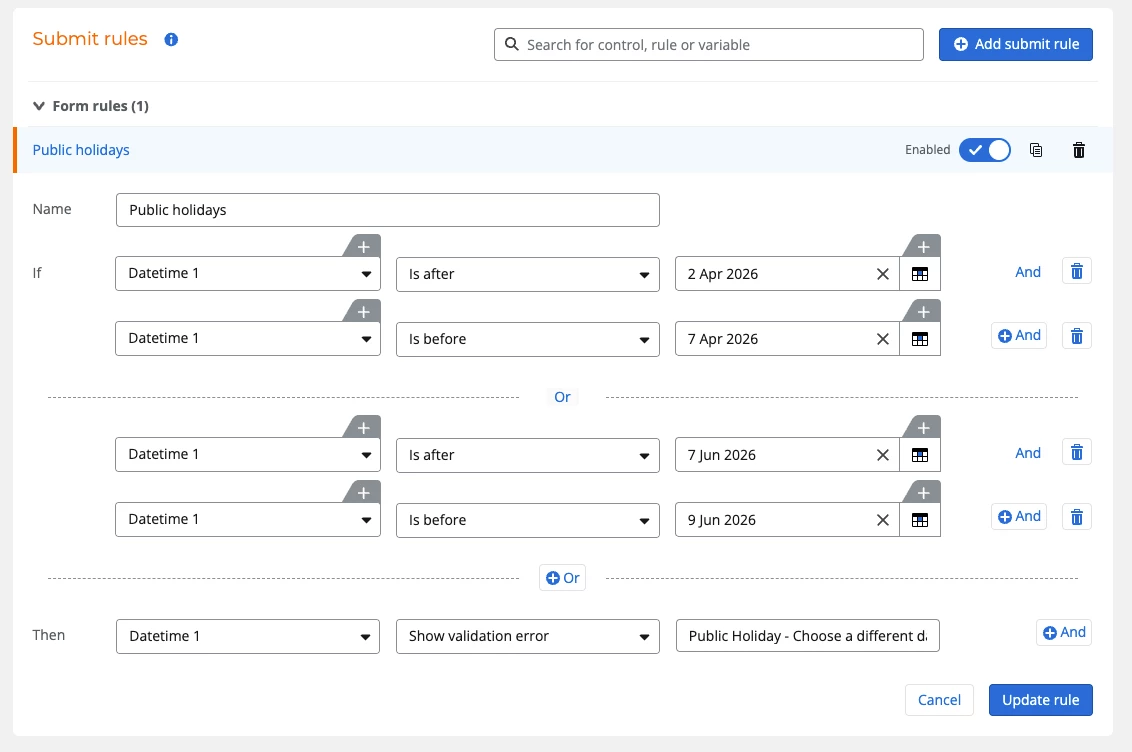
The easiest way is to add a validation rule that checks if the date chosen is between certain dates. You could have one rule for all holidays or a rule per holiday so that you could customise the validation message for that particular holiday. This does not use your SharePoint list of holidays, though.


Next option, you could use a data variable to look up the dates on your SharePoint list.  You feed this into a collection contains function that compares the collection of dates to the date entered into the date time control.  You will need to format the date to match the format of the dates coming from SharePoint. This will output a boolean true or false, which you could then use to either display a message or disable the submit button, etc.

The formula would look something like:

collectionContains([Table data].[holidays].[Rows].[Date],convertToString(formatDate([Form].[Datetime 1],"YYYY-MM-DD")))

Nintex does not do pop-ups by default, so you could use the JS-Insert plugin from the Nintex Gallery to trigger a pop-up: https://gallery.nintex.com/t/js-insert

Or check out this plugin I developed a while ago, which uses the sweet Alert library for custom popups.
https://github.com/Smuntz/Sweet-Alert


Forum|alt.badge.img+1

Thanks for the information. But we are trying to upload the holiday dates for the 5years, so it will be tough to create the rule for the upcoming 5 years.
The second option how can i insert inside form SharePoint lookup. can you show me


Simon Muntz
Nintex Partner
Forum|alt.badge.img+23
  • Nintex Partner
  • April 13, 2026

Hi ​@Pavithra Mani,

Please see the help file regarding data variables.
https://help.nintex.com/en-US/nwc/Content/Designer/FormsExternalData.htm