

Nintex Community Menu Bar
Solved

How to add a second page to an existing Nintex SharePoint 2016 Form

  • Apr 22, 2025 12:34 AM UTC
  • 4 replies
  • 138 views
  • Translate All

Forum|alt.badge.img+2

This is something that should be pretty straightforward but doesn’t appear to be (in Nintex anyway, easy in other products)

 I have a form that is out of space and requirements to add several more fields/sp list columns to the form so I need to add a second page. 

No option that I can see anywhere to add a second page. 
Best answer by Simon Muntz

Hi,

It sounds like you are using a classic form, as a responsive form will automatically extend based on the controls added.
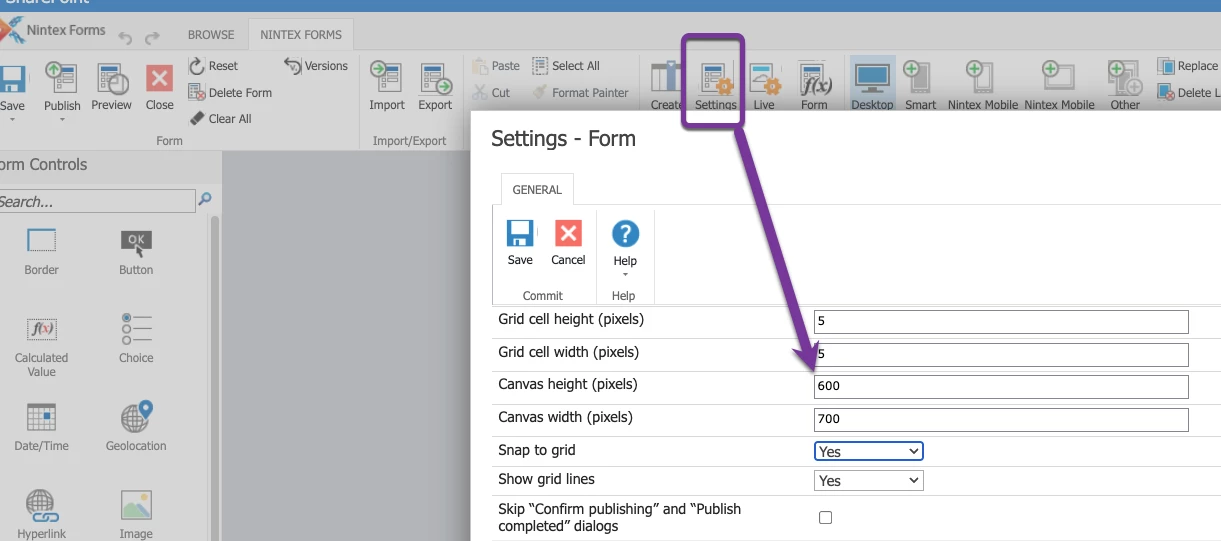
To extend a classic form, click Settings from the form designer ribbon and adjust the canvas height to give you more room.


View original

4 replies

Simon Muntz
Nintex Partner
Forum|alt.badge.img+23
  • Nintex Partner
  • Apr 22, 2025 11:04 PM UTC

Hi ​@rspear 

Welcome to the community.
Nintex Forms for SharePoint do not have paging functionality.
When you say you are out of space, what do you mean?

Translate

Forum|alt.badge.img+2
  • Author
  • Rookie
  • Apr 22, 2025 11:35 PM UTC

Thanks for the reply ​@SimonMuntz

Well I need to add about 10 more fields/controls (from a corresponding SharePoint list) but I’m at the bottom of the form and there is no room to add them. The existing fields are already at the bottom margin. There also doesn’t seem to be a way to make the form larger to accommodate the additonal fields/controls. 

Translate

Simon Muntz
Nintex Partner
Forum|alt.badge.img+23
  • Nintex Partner
  • Answer
  • Apr 23, 2025 12:11 AM UTC

Hi,

It sounds like you are using a classic form, as a responsive form will automatically extend based on the controls added.
To extend a classic form, click Settings from the form designer ribbon and adjust the canvas height to give you more room.


Translate

Forum|alt.badge.img+2
  • Author
  • Rookie
  • Apr 23, 2025 12:31 AM UTC

Yep, it's an old classic form designed by someone else. Excellent thank you for the help!

Translate



