Nintex Community Menu Bar
Answer

File Upload hangs when submitting

  • November 14, 2025
  • 6 replies
  • 44 views

Forum|alt.badge.img+4

Hi everyone

I added the File Upload control to a form. I tested it with uploading a small txt file, and the form submission hangs. The item is created in the list, but the item has no attachment in it.

Is there something I am doing wrong?

Regards

Kirk
Best answer by SimonMuntz

Hi ​@kirkie4567,

If you are unable to attach files using the SharePoint form, but Nintex forms work with other lists, then it's likely an issue with the SharePoint list.

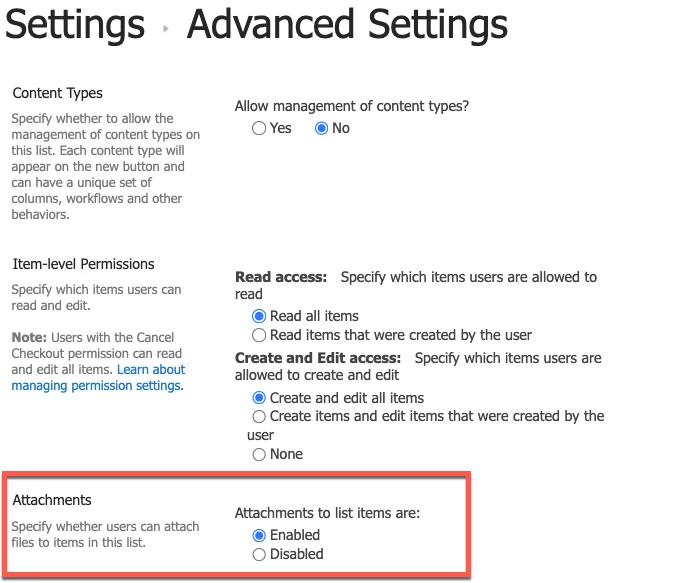
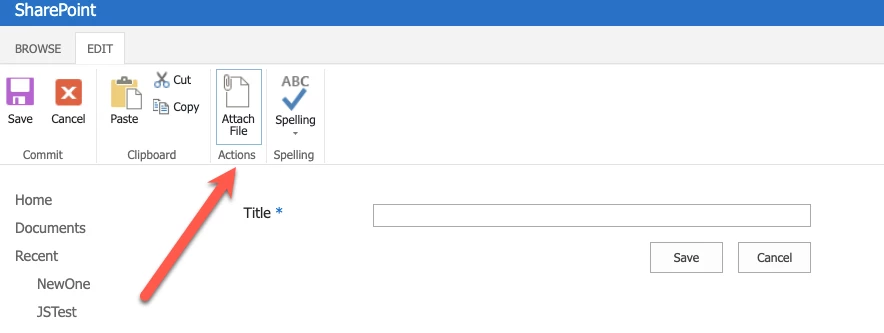
You should be able to attach files to a SharePoint item with a SharePoint form. If the option is not available, you may need to review the list settings to determine if the option for attachments has been disabled.


6 replies

SimonMuntz
Nintex Employee
Forum|alt.badge.img+23
  • Nintex Employee
  • November 17, 2025

Hi ​@kirkie4567,

This is a tough one to diagnose on this platform. The question may be more suited for Nintex Support.
When you say the form hangs, do you see a submission screen with a spinner, but no progression from that point?
Do you see any errors in the browser console (F12)?
Can you submit items to that list with attachments using the default SharePoint form?
Is this list the only one with the issue, or do other lists in the site/site collection have the same issue?


Forum|alt.badge.img+4
  • Author
  • Rookie
  • November 17, 2025

Hi ​@SimonMuntz 

Thanks for replying.

  • I do see the submission screen, but no progression from that point
  • I do not see any issues
  • I am not sure how to submit using the default Sharepoint form
  • As far as I can see, this is the only list with this error

Regards

Kirk


SimonMuntz
Nintex Employee
Forum|alt.badge.img+23
  • Nintex Employee
  • November 17, 2025
  • I am not sure how to submit using the default SharePoint form

To test with the default SharePoint form, you first need to export the Nintex form to back it up.
Then, delete the Nintex form from the Nintex form designer.
Now, create a new item on the list, and the SharePoint form will open instead of the Nintex Form.
When you add an attachment to the default SharePoint form, does the attachment submit?

The purpose of the test is to determine whether the issue originates from Nintex or SharePoint.  This test eliminates Nintex from the equation.

To restore the Nintex Form, open the Nintex Form designer and import the form file you exported.

You said you tried a .txt file. Have you tested with any other file extension?


Forum|alt.badge.img+4
  • Author
  • Rookie
  • November 17, 2025

@SimonMuntz When I delete the Nintex form, the SharePoint form does not have the File Upload control in it. I couldn't get the form to show the control. Seems like it is a Nintex problem. I have another form with the identical control, but the form submits no problem


SimonMuntz
Nintex Employee
Forum|alt.badge.img+23
  • Nintex Employee
  • Answer
  • November 17, 2025

Hi ​@kirkie4567,

If you are unable to attach files using the SharePoint form, but Nintex forms work with other lists, then it's likely an issue with the SharePoint list.

You should be able to attach files to a SharePoint item with a SharePoint form. If the option is not available, you may need to review the list settings to determine if the option for attachments has been disabled.


Forum|alt.badge.img+4
  • Author
  • Rookie
  • November 25, 2025

Thanks ​@SimonMuntz  there is something wrong with the list. I successfully created a new list and imported the settings and form into it, and it works perfectly.