



Issue
While generating documents you may be presented with the following message:
"Document generation complete. Click to continue."
Resolution
Click the button that is displayed to continue with the document generation process
Error Code
N/A
Additional Information
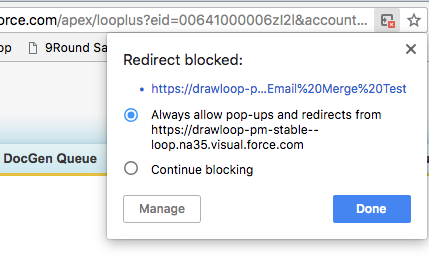
Due to a change in Chrome version 68, you may need to enable redirects similar to how you would enable popups. Use the steps below to enable redirects:
-
Look for the Redirect Warning icon in the address bar of your browser:

-
Click the icon, select the radio next to the “Always allow pop-ups and redirects from <Salesforce URL>.
-
Click the Done button
Related Links
Configure Microsoft Word templates for email: https://help.nintex.com/en-US/docgen/docservices/#docgen-sfdc/Services/manageDDP/EmailTemplates.htm