




OData API - 401 Unauthorized
kbt142118
PRODUCTK2 Five 5.1
BASED ONK2 Five 5.1
TAGSOData API
This article was created in response to a support issue logged with K2. The content may include typographical errors and may be revised at any time without notice. This article is not considered official documentation for K2 software and is provided "as is" with no warranties.
LEGACY/ARCHIVED CONTENT
This article has been archived, and/or refers to legacy products, components or features. The content in this article is offered "as is" and will no longer be updated. Archived content is provided for reference purposes only. This content does not infer that the product, component or feature is supported, or that the product, component or feature will continue to function as described herein.
Issue
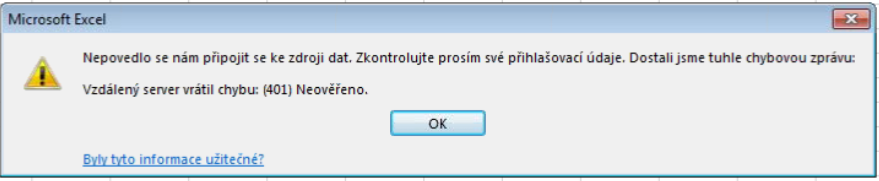
You are unable to access Odata API with an AAD account and a 401 Unauthorized error message appears.
Symptoms
In this case we had two security labels AAD & K2SQL. The K2SQL label was set to default in the HostServer.SecurityLabel table in the K2 Database and Basic authentication was enabled on the OData API.Resolution
To resolve this please do the following:
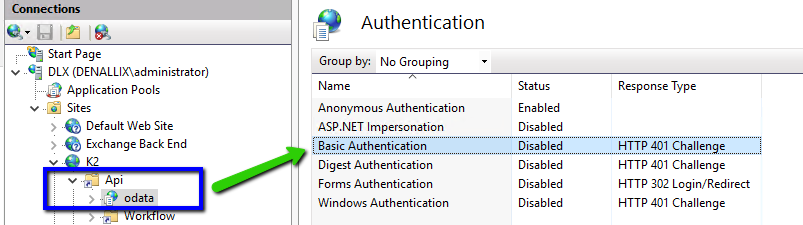
1. Disable Basic Authentication for the Odata in the IIS:
2. In the Odata APIs web config K2WebServicesAPISmartObjectService.ODataweb.config , add the DefaultSecurityLabel key to it pointing to AAD:
<appSettings>
<add key="DefaultSecurityLabel" value="AAD" />
<add key="DefaultSecurityLabel" value="AAD" />
3. Setup AAD consent as described here:
http://help.k2.com/onlinehelp/k2five/userguide/5.1/default.htm#K2-Management-Site/Integration/APIs.htm%3FTocPath%3DAdminister%7CK2%2520Management%7CIntegration%7CAPI%2520Configuration%7C_____0