Nintex Community Menu Bar
Question

Workflow got stuck when using the GoTo Activity.

  • July 7, 2026
  • 5 replies
  • 30 views

Forum|alt.badge.img+2

Hi Team,

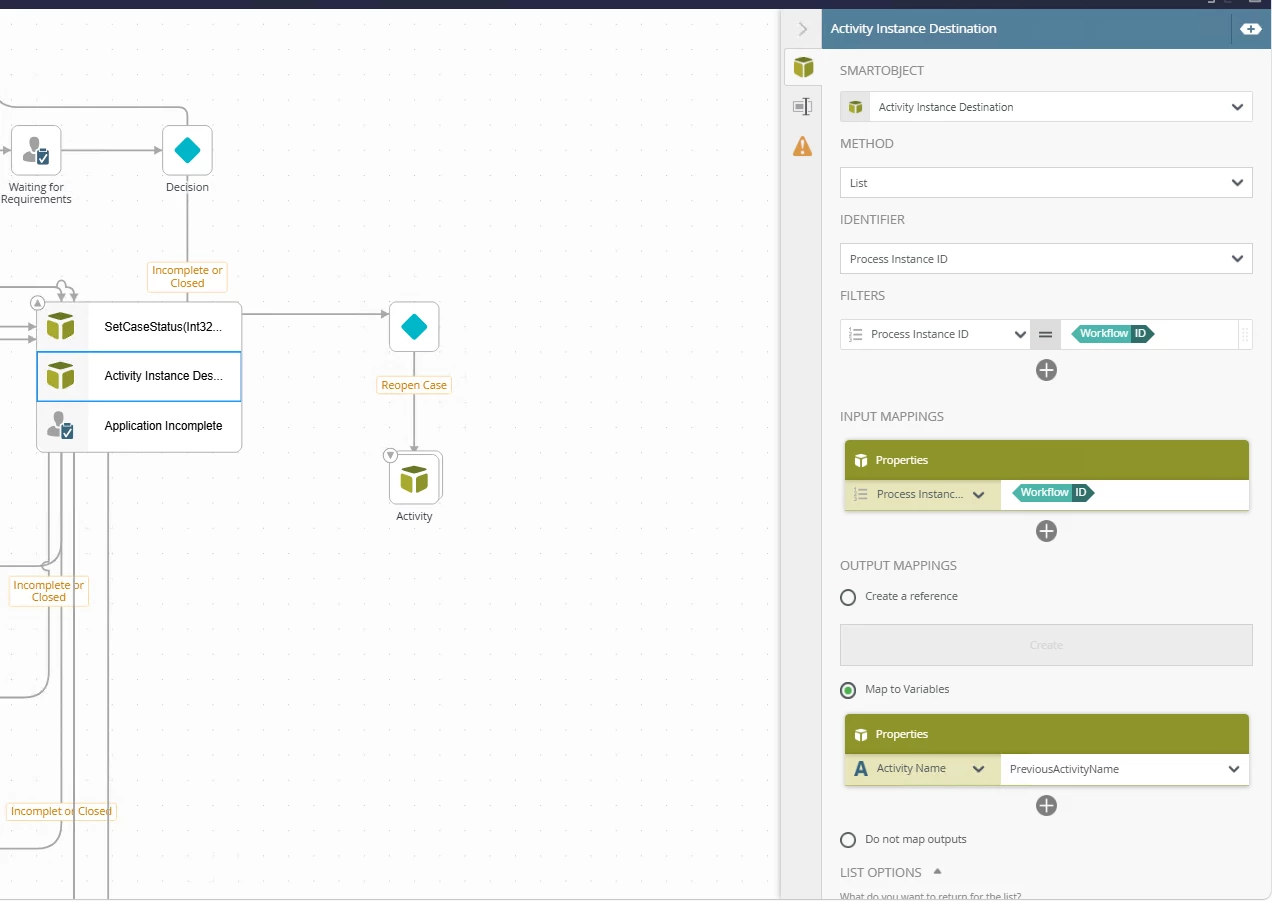
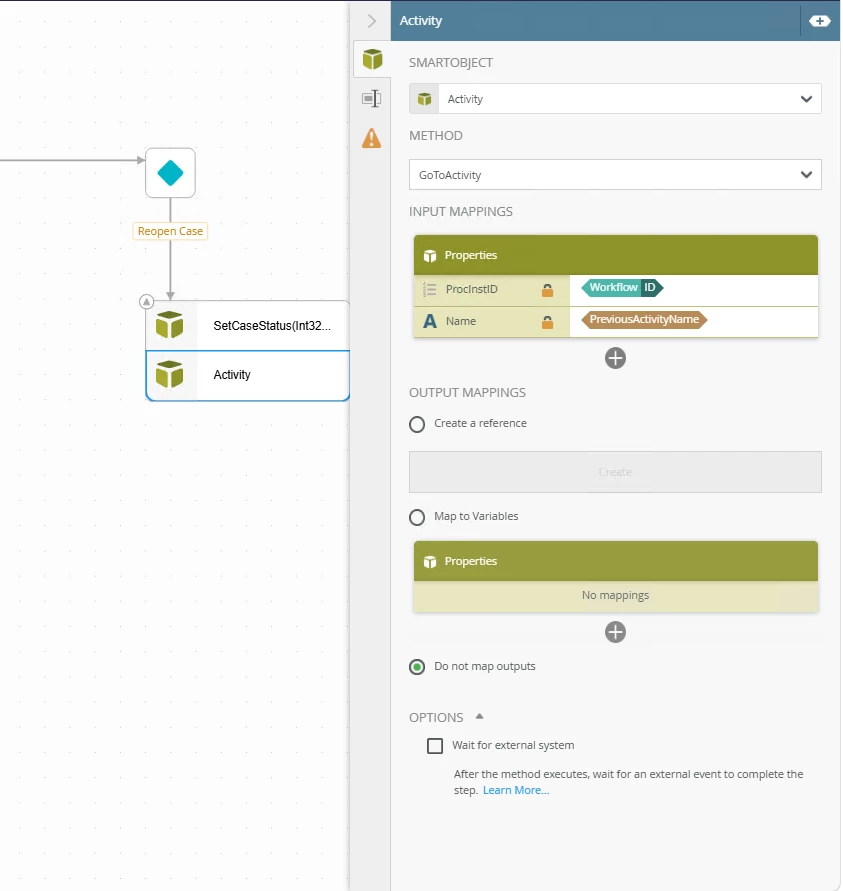
I'm capturing the previous activity into a variable called previousActivityName using the Active Instance Destination SmartObject. Then, I'm using previousActivityName with the GoToActivity SmartObject.
I am facing an issue where the workflow instance got stuck in the running state. Please help me with the issue
 

5 replies

Forum|alt.badge.img+11
  • Nintex Employee
  • July 7, 2026

Somethings to try:

  1. Are you able to make this GotoActivity call on the same workflow instance through the K2 Management site/SmartObject Service Tester tool instead?  If so, it may not be possible to call GoToActivity against the same workflow instance that is making the call.
    1. You can try moving the GoToActivity into a subworkflow and just passing in those inputs as workflow start variables
  2. Could be permissions related, as GoToActivity SMO call will run as K2 Service account, does K2 service account have permission on the workflow?  Perhaps Workflow Admin rights?
  3. Does it need to be GoToActivity?  Can you just connect the Reopen Case line back to where it needs to go back to?

ScottCaseIT
Nintex Partner
Forum|alt.badge.img+4
  • Nintex Partner
  • July 7, 2026

You cannot use a GoToActivity call from inside a workflow to act upon that same workflow.  It is not allowed and will cause DB locking issues. 

The reason is that at the time that GoTo is called from the SmO, the process is still in a running state and hasn’t been persisted to the database, ie Deadlock.


ScottCaseIT
Nintex Partner
Forum|alt.badge.img+4
  • Nintex Partner
  • July 7, 2026

Somethings to try:

  1. Are you able to make this GotoActivity call on the same workflow instance through the K2 Management site/SmartObject Service Tester tool instead?  If so, it may not be possible to call GoToActivity against the same workflow instance that is making the call.
    1. You can try moving the GoToActivity into a subworkflow and just passing in those inputs as workflow start variables
  2. Could be permissions related, as GoToActivity SMO call will run as K2 Service account, does K2 service account have permission on the workflow?  Perhaps Workflow Admin rights?
  3. Does it need to be GoToActivity?  Can you just connect the Reopen Case line back to where it needs to go back to?

To Tin’s point, you may craft a work around by calling a sub process, but the thing is you would have to ensure that the parent process reached an “Active” state and was waiting before the child process attempted to GoToActivity on the parent process.


Forum|alt.badge.img+2
  • Author
  • Rookie
  • July 7, 2026

Thanks for the quick reply these are my findings.
1. The service account has admin rights on the workflow.
2. I need to capture  the last user activity step whenever the user selects the Incomplete or Closed and then if the user selects the Reopen case it should go back to the last user activity step.
3. If i create as a Sub workflow it will start from the first step but my requirement is go to the previous active step.


Forum|alt.badge.img+2
  • Author
  • Rookie
  • July 7, 2026

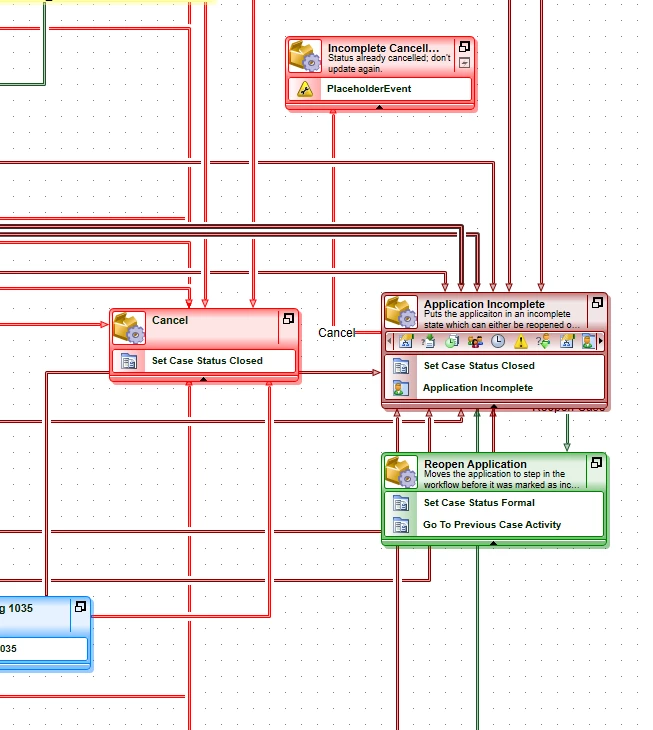
I'm attempting to upgrade an older K2 BlackPearl workflow by migrating it to Nintex K2 Five 5.8 using the K2 Designer tool.