
Nintex Community Menu Bar
Question

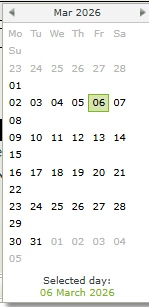
Why does the calendar look like this?

  • March 6, 2026
  • 6 replies
  • 29 views

Forum|alt.badge.img+16


There is no way to re-size it, and yes the browser is full screen….

 

6 replies

Forum|alt.badge.img
  • Nintex Employee
  • March 6, 2026

Good day,

It seems like your styling on the calendar control is being affected by something.

Could you answer the following?

  • Which version of K2 are you experiencing this behavior on?
  • Do you have some custom CSS that is being applied?
  • Have you cleared the cache of the browser?

Regards,


Forum|alt.badge.img+16
  • Author
  • Scout
  • March 6, 2026

Good day,

It seems like your styling on the calendar control is being affected by something.

Could you answer the following?

  • Which version of K2 are you experiencing this behavior on?
  • Do you have some custom CSS that is being applied?
  • Have you cleared the cache of the browser?

Regards,


Hi, thanks for your reply. This is on v5.7 and there no custom styling. Cache has been cleared, also tried private window and other browsers


Forum|alt.badge.img
  • Nintex Employee
  • March 6, 2026

Good day,

It seems like your styling on the calendar control is being affected by something.

Could you answer the following?

  • Which version of K2 are you experiencing this behavior on?
  • Do you have some custom CSS that is being applied?
  • Have you cleared the cache of the browser?

Regards,


Hi, thanks for your reply. This is on v5.7 and there no custom styling. Cache has been cleared, also tried private window and other browsers

I would like to suggest that you attempt to restart you Internet Information Services (IIS). If that does not resolve the issue, there is no easy way to resize this, but if you are a bit more technical, you could adjust the width that is being set in the Core.less. File location is [install Directory]\K2\K2 smartforms Runtime\Styles\Themes\Core.less. Within that file you would need to find the selector ".theme-entry .week" and change the min-width to "min-width: auto;”

Please note that any future install would see this workaround being overwritten. 


Forum|alt.badge.img+16
  • Author
  • Scout
  • March 6, 2026

Good day,

It seems like your styling on the calendar control is being affected by something.

Could you answer the following?

  • Which version of K2 are you experiencing this behavior on?
  • Do you have some custom CSS that is being applied?
  • Have you cleared the cache of the browser?

Regards,


Hi, thanks for your reply. This is on v5.7 and there no custom styling. Cache has been cleared, also tried private window and other browsers

I would like to suggest that you attempt to restart you Internet Information Services (IIS). If that does not resolve the issue, there is no easy way to resize this, but if you are a bit more technical, you could adjust the width that is being set in the Core.less. File location is [install Directory]\K2\K2 smartforms Runtime\Styles\Themes\Core.less. Within that file you would need to find the selector ".theme-entry .week" and change the min-width to "min-width: auto;”

Please note that any future install would see this workaround being overwritten. 

Is this fixed in newer versions of K2 such as 5.8.1?


Forum|alt.badge.img
  • Nintex Employee
  • March 6, 2026

Good day,

It seems like your styling on the calendar control is being affected by something.

Could you answer the following?

  • Which version of K2 are you experiencing this behavior on?
  • Do you have some custom CSS that is being applied?
  • Have you cleared the cache of the browser?

Regards,


Hi, thanks for your reply. This is on v5.7 and there no custom styling. Cache has been cleared, also tried private window and other browsers

I would like to suggest that you attempt to restart you Internet Information Services (IIS). If that does not resolve the issue, there is no easy way to resize this, but if you are a bit more technical, you could adjust the width that is being set in the Core.less. File location is [install Directory]\K2\K2 smartforms Runtime\Styles\Themes\Core.less. Within that file you would need to find the selector ".theme-entry .week" and change the min-width to "min-width: auto;”

Please note that any future install would see this workaround being overwritten. 

Is this fixed in newer versions of K2 such as 5.8.1?

From investigations done, I was unable to reproduce this issue on 5.7 or any newer released version of the product. 


Forum|alt.badge.img+5
  • Nintex Employee
  • March 6, 2026

Could this potentially be related to the layout container where the Calendar control is being used?

As a next step, could you please try recreating the scenario on a brand new view with a very simple layout, for example a single column layout containing only the Calendar control and no additional styling or controls?

This will help isolate whether the behavior is caused by:

  • A layout or container width constraint

  • Responsive rules or column configuration

  • Or something specific to the original view configuration

If the issue persists on a clean, minimal view, we can more confidently rule out layout constraints and investigate further.



