Nintex Community Menu Bar
Question

Rule for Multiple Choice won't work

  • May 6, 2026
  • 5 replies
  • 19 views

Forum|alt.badge.img+16

Got a Choice Control with 5 items with multiple option selection enabled.

The last option in the list is Other, when the user ticks that box, I want it to make a textarea become visible underneath,


A advanced rule works if you only pick the Other box and it shows/hides the textarea accordingly.

However, if the user picks another item and the Other option, then it doesn;t work.


With Multiple data type, i did a message and it shows the value as Option1;Option2 etc etc. So i assumed I could you advanced rule to say if Choice CONTAINS the Other value, but it won’t work.


Why doesn’t the advanced condition work? The Choice control has two items picked, so you would think I could that in an advanced condition to say if it contains Other then do something.


Any ideas?  

5 replies

Forum|alt.badge.img+15
  • Nintex Partner
  • May 6, 2026

Hi Sharpharp1, you’re on the right path! In your advanced condition, see if this helps identify if “Other” is selected as the underlying value of this control is XML:


<collection><object><fields><field><value>Other</value></field></fields></object></collection>


Forum|alt.badge.img+16
  • Author
  • Scout
  • May 6, 2026

Hi Sharpharp1, you’re on the right path! In your advanced condition, see if this helps identify if “Other” is selected as the underlying value of this control is XML:


<collection><object><fields><field><value>Other</value></field></fields></object></collection>

Hi,

Where does this XML go in the advanced condition?


Forum|alt.badge.img+15
  • Nintex Partner
  • May 6, 2026

Hold on a sec, I think I misread your original problem. I thought you wanted the text area to appear if ONLY the “Other” selection was made. I see now that you have the opposite problem where it doesn’t appear if anything else is also selected. Let me experiment for a minute here, I would think your original approach with the “Contains” would have worked.


Forum|alt.badge.img+15
  • Nintex Partner
  • May 6, 2026

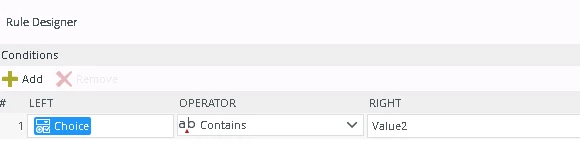
Ok, I tried with an Advanced Condition where the multi-select field contains Other and it did work as expected - can you show a snippet of your rule so we can have a look?


Forum|alt.badge.img+16
  • Author
  • Scout
  • May 7, 2026

Ok, I tried with an Advanced Condition where the multi-select field contains Other and it did work as expected - can you show a snippet of your rule so we can have a look?

Thanks tbyrne,

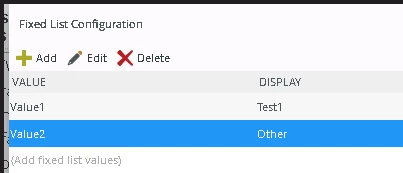
Ok so I have a Choice Control, Data Type is MultiValiue. 6 items in the list. Item 6 is called other. 

Underneath the Choice is a hidden Textarea.

Users can tick more than one Choice. 

Trying to get the rule to say if Item 6 (Other) is ticked, then make the Textarea visible. -This works fine, when only Item 6 is ticked. However if you tick another item as well, the rule does not work.


When the control is Changed
if an advanced condition is true
then complete the following one after another
then show a message to the user (configure)
then show 4b Other Text Area control
if Q4a Choice does not contain Other (enter text-below)
then set the properties of 4b Other Text Area control (configure)


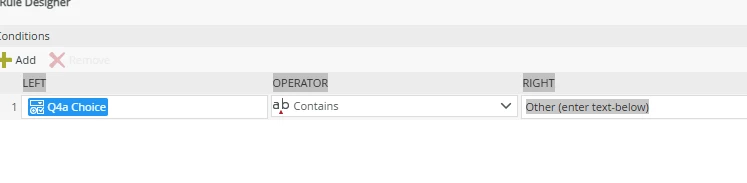
Advanced rule is 


The Contains should work, but doesn’t. I tried the right side with just the word Other, again it works only if item 6 Other is ticked, but if another item is selected as well, it does not work. 

Could the MultiValue Data type be the issue? After all this, I want to write the values to a Smartobject and re-load the form later with the Choice values re-loading into the form, so i need to ensure they get saved properly and able to re-populate the choice control. But for now, the basic of displaying a text area isn’t functioning when two or more choices are picked and one of the those is the Other item.


If you need any more info, let me know,

Thanks again