

Nintex Community Menu Bar
Solved

K2 Five 5.9 Upgrade - Custom Controls No Longer Working After Upgrade from 5.8

  • Nov 12, 2026 6:48 AM UTC
  • 5 replies
  • 30 views
  • Translate All

Forum|alt.badge.img+1

Hi Team,

Hope you are doing well.

We recently upgraded K2 Five 5.8 to K2 Five 5.9 successfully. After the upgrade, all our DLL-based custom controls stopped working.

We have spent considerable time troubleshooting the issue and performed multiple tests, including:

  • Simplifying the custom control implementation to a basic "Hello World" control.
  • Creating brand-new views.
  • Re-registering the custom control.
  • Testing with different custom controls.
  • Testing with the official K2 custom control sample.
  • Verifying that the custom control assemblies load correctly.
  • Checking assembly dependencies and runtime DLL loading.

The outcome is always the same.

Browser Error

Server Error

Exception of type 'System.Web.HttpUnhandledException' was thrown.

Extender control

'00000000-0000-0000-0000-000000000000_6fa2dcf8-4254-01d5-8499-ebfa1ffd64b0'

is not a registered extender control.

Extender controls must be registered using RegisterExtenderControl()

before calling RegisterScriptDescriptors().

Parameter name: extenderControl

(HTTP 500 Error)


Runtime Log Error

The K2 Runtime logs show the following exception before the browser error occurs:

System.NullReferenceException

at SourceCode.Forms.Rendering.Web.FlowRenderer.CreateChildControls()

at System.Web.UI.Control.EnsureChildControls()

at SourceCode.Forms.Web.Runtime.View.DoLoad()

This exception consistently occurs while K2 is rendering the view.

Important Findings

  • The same custom controls work correctly on K2 Five 5.8.
  • The issue started only after upgrading to K2 Five 5.9.
  • The official K2 custom control sample also exhibits the same behavior.
  • A colleague from another organization reported experiencing the same issue after moving to K2 5.9.
  • Standard SmartForms controls work normally.
  • The custom control DLL loads successfully and the assemblies are readable.
  • The failure appears to occur inside SourceCode.Forms.Rendering.Web.FlowRenderer.CreateChildControls() before the custom control lifecycle begins.


Your support would be greatly appreciated.

Kind regards,
Best answer by LouwJ

Hi,


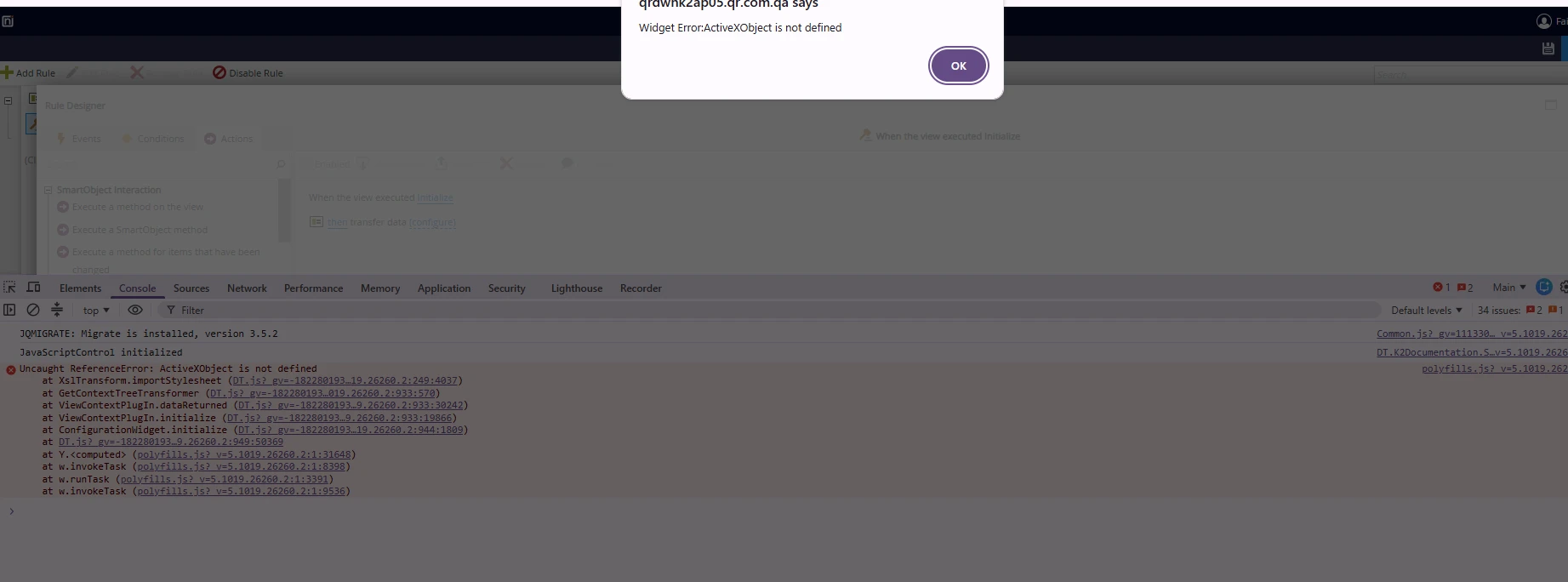
one more help needed. after upgrade to 5.9, once i am clicking on configure of transfer data. its showing this alert ActiveXObject not found. Can you guide in this please.

Regards,

Hi, 


This seems related the chromium browsers XSLT Deprecation.
In native.forms.xml.js, importStylesheet picks one of three ways to run the XSLT:

  1. Server-side XSLT, if SourceCode.Forms.Settings.UseServerSideXsltProcessor is on (or not set, and the browser has no XSLT support).
  2. The browser'sXSLTProcessor , if it exists.
  3. Otherwise new ActiveXObject("Msxml2..."), the IE path, which is where it fails.

So two things were true at once:

  • The browser has noXSLTProcessor . Chrome (and Chromium-based Edge) is removing built-in XSLT support. On builds where it has been removed or disabled by flag or policy, typeof XSLTProcessor === "undefined".
  • The server-side XSLT fallback wasn't used. Either the customer's build (5.1019.26260.2) predates it, orUseServerSideXsltProcessor is set to false. The fallback was merged in PR 12386 "XSLT on Main" on 2026-08-24 and is in the 5.9 hf branch. The Designer Web.config ships with <add key="UseServerSideXsltProcessor" value="true" />.

This is not related to the custom control or extender issue.


To test this, in the browser console (F12) paste the following one line at a time:

typeof XSLTProcessor
If the output is "undefined" = browser has no XSLT

SourceCode.Forms.Settings.UseServerSideXsltProcessor
if the output is false/undefined = fallback off or not in this build

typeof SourceCode.Forms.Utilities.XsltHelper

if the output is "undefined" = build predates the fallback
 

Proper fix: install the 5.9 fix pack or hotfix that includes the server-side XSLT fallback. Then make sure the Designer and Runtime web.config don't set UseServerSideXsltProcessor to false. Leaving it unset or setting it to true both work. Recycle the app pools afterwards.

If the build already has the fallback: just setUseServerSideXsltProcessor to true and recycle.

View original

5 replies

Forum|alt.badge.img+2
  • Nintex Employee
  • Nov 12, 2026 8:41 AM UTC

Hi,

Thanks for the detailed write-up. The NullReferenceException in FlowRenderer.CreateChildControls() is the root cause. The "Extender control … is not a registered extender control" error is a side effect of it. When the view fails partway through rendering, the extender for the layout table never gets registered, and ASP.NET raises that error when the page renders. Fix the first error and the second one goes away.

We've seen this on several 5.9 upgrades. It usually comes down to one or both of the points below.

1. The use of "Custom" as the <Group> in ControlDefinition.xml

K2 5.9 added a new kind of custom control that you build in the Management site, without a DLL. SmartForms identifies those controls by the group name Custom. If a DLL-based control registered with controlutil.exe also uses  <Group>Custom</Group>, 5.9 treats it as one of the new controls. It then can't find it among them and fails while rendering. That gives the NullReferenceException at runtime, and errors such as "Cannot read properties of undefined" or "Object reference" when you edit the view or open the Rules designer.

What to do:

  1. Change <Group> to anything other than exactly Custom, for example your company or project name.
  2. Rebuild the control assembly.
  3. Re-register it: controlutil.exe register -assembly:"<path>\YourControl.dll"
  4. Clear the control cache: controlutil.exe CLEARCONTROLCACHE
  5. Recycle the K2 SmartForms application pools, or run iisreset.
  6. Test the view. If an existing view still fails, remove the control from the view, add it back and check in again.

2. Deregister and re-register legacy controls after upgrading

Some customers only needed a clean re-registration. Control assemblies are stored in the K2 database and loaded from there. A control registered before the upgrade can keep stale metadata or old dependency DLLs.

  1. Back up the K2 database and note which views and forms use the control.
  2. Deregister: controlutil.exe deregister -assembly:"<path>\YourControl.dll", or use -control:<ControlName>.
  3. Rebuild the control against the 5.9 SDK assemblies (SourceCode.Forms.Controls.Web.SDK.dll and the others from your 5.9 install), then register it again.
  4. Run CLEARCONTROLCACHE and recycle the application pools.

3. Review the control code

5.9 is stricter about some mistakes that older versions let through. Things to check:

  • Client script that runs as soon as it loads. Control scripts are bundled and load in the designer as well as at runtime. Code like document.getElementById("myElement").addEventListener(...) runs before your control's markup exists and throws "Cannot read properties of null". Attach handlers with delegated events, for example $(document).on("click", ".my-control-class", ...), or in your init method.
  • Hard-coded element IDs. Fixed IDs such as dropZone break when the control is used more than once on a view. Base IDs and classes on the control's own ID.
    Unescaped user input. If the control builds XML or HTML from user input (file names, text), escape it before inserting it.
  • Bundling K2 platform DLLs with the control. Don't pass SourceCode.* assemblies to controlutil as support files, and don't copy them along with the control into the K2 bin folders. Set Copy Local = False on the K2 references. Duplicate copies of platform assemblies cause hard-to-trace load and type problems.
  • Post-build copy steps. Some sample projects copy the control DLL straight into K2 smartforms Designer\bin and K2 smartforms Runtime\bin. The control is already loaded from the database, so an extra disk copy can get out of sync with the registered version. Deploy only through controlutil.exe register.
  • Properties expected by the designer. Make sure your ControlDefinition.xml is complete and valid: name, group, category, properties, data types and events..

4. General upgrade checks for custom controls

  • Rebuild every custom control against the version you upgraded to, rather than reusing DLLs built on 5.8.
  • After any change to a registered control, always run CLEARCONTROLCACHE and recycle the SmartForms application pools
  • Check the browser console (F12) in both the designer and at runtime. Script errors there often point straight at the control's JavaScript.
  • Test in a non-production environment first, and keep a list of the views and forms that use each control so you can retest them.

In most cases, renaming the group (point 1) plus a clean re-registration (point 2) brings DLL-based controls back.

Kind regards,

Translate

Forum|alt.badge.img+1
  • Author
  • Rookie
  • Nov 12, 2026 9:50 AM UTC

Hi,

Thanks for the detailed write-up. The NullReferenceException in FlowRenderer.CreateChildControls() is the root cause. The "Extender control … is not a registered extender control" error is a side effect of it. When the view fails partway through rendering, the extender for the layout table never gets registered, and ASP.NET raises that error when the page renders. Fix the first error and the second one goes away.

We've seen this on several 5.9 upgrades. It usually comes down to one or both of the points below.

1. The use of "Custom" as the <Group> in ControlDefinition.xml

K2 5.9 added a new kind of custom control that you build in the Management site, without a DLL. SmartForms identifies those controls by the group name Custom. If a DLL-based control registered with controlutil.exe also uses  <Group>Custom</Group>, 5.9 treats it as one of the new controls. It then can't find it among them and fails while rendering. That gives the NullReferenceException at runtime, and errors such as "Cannot read properties of undefined" or "Object reference" when you edit the view or open the Rules designer.

What to do:

  1. Change <Group> to anything other than exactly Custom, for example your company or project name.
  2. Rebuild the control assembly.
  3. Re-register it: controlutil.exe register -assembly:"<path>\YourControl.dll"
  4. Clear the control cache: controlutil.exe CLEARCONTROLCACHE
  5. Recycle the K2 SmartForms application pools, or run iisreset.
  6. Test the view. If an existing view still fails, remove the control from the view, add it back and check in again.

2. Deregister and re-register legacy controls after upgrading

Some customers only needed a clean re-registration. Control assemblies are stored in the K2 database and loaded from there. A control registered before the upgrade can keep stale metadata or old dependency DLLs.

  1. Back up the K2 database and note which views and forms use the control.
  2. Deregister: controlutil.exe deregister -assembly:"<path>\YourControl.dll", or use -control:<ControlName>.
  3. Rebuild the control against the 5.9 SDK assemblies (SourceCode.Forms.Controls.Web.SDK.dll and the others from your 5.9 install), then register it again.
  4. Run CLEARCONTROLCACHE and recycle the application pools.

3. Review the control code

5.9 is stricter about some mistakes that older versions let through. Things to check:

  • Client script that runs as soon as it loads. Control scripts are bundled and load in the designer as well as at runtime. Code like document.getElementById("myElement").addEventListener(...) runs before your control's markup exists and throws "Cannot read properties of null". Attach handlers with delegated events, for example $(document).on("click", ".my-control-class", ...), or in your init method.
  • Hard-coded element IDs. Fixed IDs such as dropZone break when the control is used more than once on a view. Base IDs and classes on the control's own ID.
    Unescaped user input. If the control builds XML or HTML from user input (file names, text), escape it before inserting it.
  • Bundling K2 platform DLLs with the control. Don't pass SourceCode.* assemblies to controlutil as support files, and don't copy them along with the control into the K2 bin folders. Set Copy Local = False on the K2 references. Duplicate copies of platform assemblies cause hard-to-trace load and type problems.
  • Post-build copy steps. Some sample projects copy the control DLL straight into K2 smartforms Designer\bin and K2 smartforms Runtime\bin. The control is already loaded from the database, so an extra disk copy can get out of sync with the registered version. Deploy only through controlutil.exe register.
  • Properties expected by the designer. Make sure your ControlDefinition.xml is complete and valid: name, group, category, properties, data types and events..

4. General upgrade checks for custom controls

  • Rebuild every custom control against the version you upgraded to, rather than reusing DLLs built on 5.8.
  • After any change to a registered control, always run CLEARCONTROLCACHE and recycle the SmartForms application pools
  • Check the browser console (F12) in both the designer and at runtime. Script errors there often point straight at the control's JavaScript.
  • Test in a non-production environment first, and keep a list of the views and forms that use each control so you can retest them.

In most cases, renaming the group (point 1) plus a clean re-registration (point 2) brings DLL-based controls back.

Kind regards,

Hi LouwJ,


Thanks for your quick response. it saved alot of time.

just i changed the group name from Custom to Custom2 and its starts working.

Thanks alot.

Translate

Forum|alt.badge.img+1
  • Author
  • Rookie
  • Nov 12, 2026 9:56 AM UTC

Hi,


one more help needed. after upgrade to 5.9, once i am clicking on configure of transfer data. its showing this alert ActiveXObject not found. Can you guide in this please.

Regards,

Translate

Forum|alt.badge.img+2
  • Nintex Employee
  • Answer
  • Nov 12, 2026 10:12 AM UTC

Hi,


one more help needed. after upgrade to 5.9, once i am clicking on configure of transfer data. its showing this alert ActiveXObject not found. Can you guide in this please.

Regards,

Hi, 


This seems related the chromium browsers XSLT Deprecation.
In native.forms.xml.js, importStylesheet picks one of three ways to run the XSLT:

  1. Server-side XSLT, if SourceCode.Forms.Settings.UseServerSideXsltProcessor is on (or not set, and the browser has no XSLT support).
  2. The browser'sXSLTProcessor , if it exists.
  3. Otherwise new ActiveXObject("Msxml2..."), the IE path, which is where it fails.

So two things were true at once:

  • The browser has noXSLTProcessor . Chrome (and Chromium-based Edge) is removing built-in XSLT support. On builds where it has been removed or disabled by flag or policy, typeof XSLTProcessor === "undefined".
  • The server-side XSLT fallback wasn't used. Either the customer's build (5.1019.26260.2) predates it, orUseServerSideXsltProcessor is set to false. The fallback was merged in PR 12386 "XSLT on Main" on 2026-08-24 and is in the 5.9 hf branch. The Designer Web.config ships with <add key="UseServerSideXsltProcessor" value="true" />.

This is not related to the custom control or extender issue.


To test this, in the browser console (F12) paste the following one line at a time:

typeof XSLTProcessor
If the output is "undefined" = browser has no XSLT

SourceCode.Forms.Settings.UseServerSideXsltProcessor
if the output is false/undefined = fallback off or not in this build

typeof SourceCode.Forms.Utilities.XsltHelper

if the output is "undefined" = build predates the fallback
 

Proper fix: install the 5.9 fix pack or hotfix that includes the server-side XSLT fallback. Then make sure the Designer and Runtime web.config don't set UseServerSideXsltProcessor to false. Leaving it unset or setting it to true both work. Recycle the app pools afterwards.

If the build already has the fallback: just setUseServerSideXsltProcessor to true and recycle.

Translate

Forum|alt.badge.img+1
  • Author
  • Rookie
  • Nov 12, 2026 11:09 AM UTC

Hi,


Thanks for the reply.

Current build donot have setUseServerSideXsltProcessor in designer web.config. i will install the fixpack and try. 


any how i tried in the Edge and its working proper there.


Thanks for the guidance.

Regards,

Translate