




Unable to 'Backspace' in 'Text Area control'
kbt151128
PRODUCTK2 Five 5.0
BASED ONK2 Five 5.0
This article was created in response to a support issue logged with K2. The content may include typographical errors and may be revised at any time without notice. This article is not considered official documentation for K2 software and is provided "as is" with no warranties.
Issue
Users cannot use the backspace in the Text Area control to clear the text entered.Symptoms
If you have added a 'Text Area control' to a read-only table, and making it editable in your rules, you will not be able to use the backspace when clearing data.
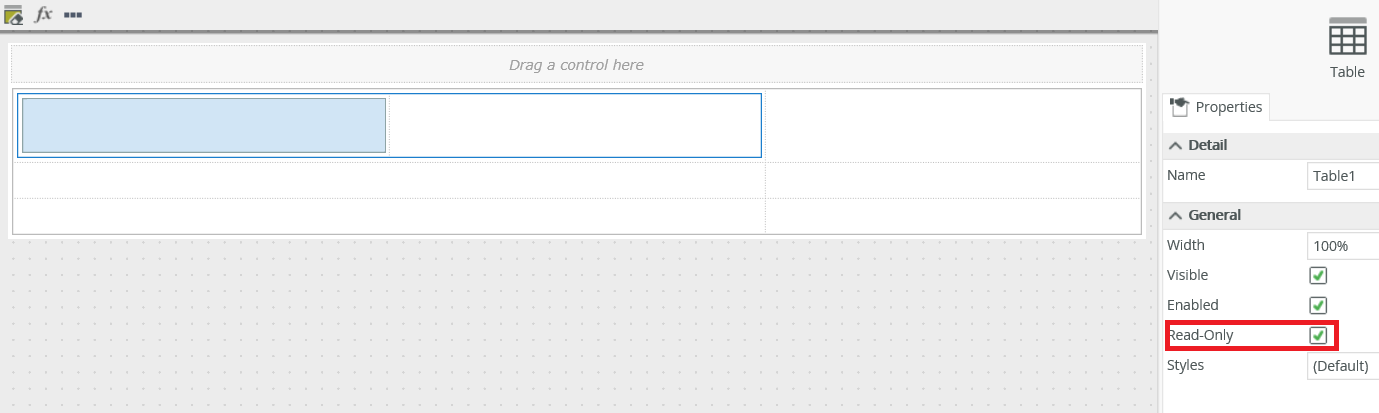
You will only be able to clear text by highlighting the text and pressing Delete key.
Troubleshooting Steps
To resolve this:
Clear the Read-Only checkbox of the table control in layout tab.
OR
Make the table Editable in 'Specify edit state for View controls' action.
