




K2 for SharePoint activation fails with 404 error
KBS100253
PRODUCTK2 Five
K2 blackpearl 4.7
BASED ONK2 blackpearl 4.7
This article was created in response to a support issue logged with K2. The content may include typographical errors and may be revised at any time without notice. This article is not considered official documentation for K2 software and is provided "as is" with no warranties.
Issue
When trying to activate a SharePoint site to integrate with K2, it just keeps trying to activate but is unsuccessful.
Symptoms
Each activation fails to go through.
Troubleshooting Steps
Check the hidden K2 Settings list to make sure that the URLs being used are correct.
The K2 Settings list can be found here: https://[SHAREPOINTSITECOLLECTIONURL]/lists/K2 Settings
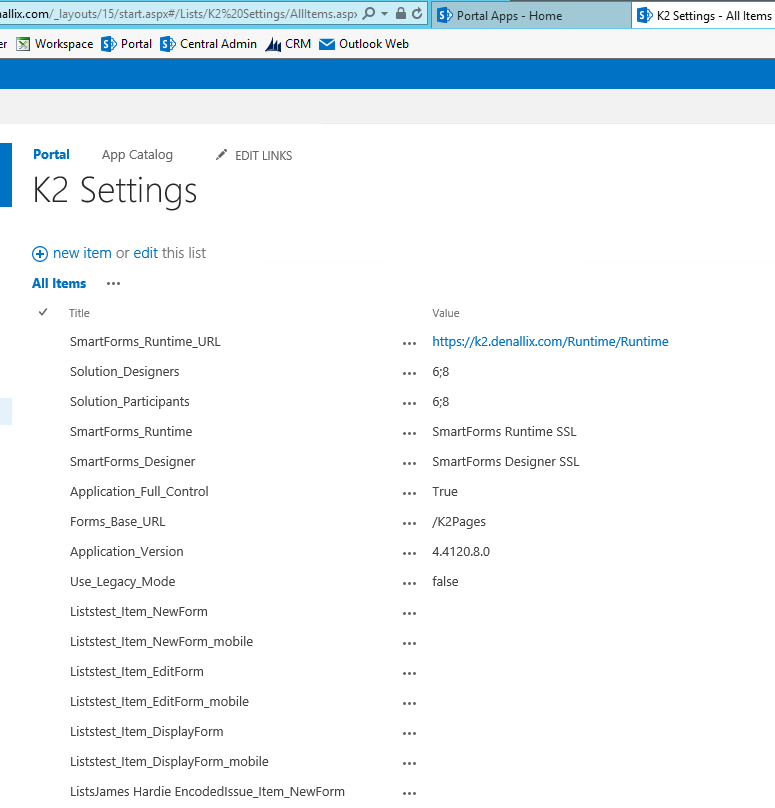
Make sure that the Smartforms_Runtime_URL is pointing to the correct K2 URL.
Also, check that the Smartforms_Runtime and Smartforms_Designer are pointing to a correct Environment Library variable in K2 Management.