




Hi everyone!
Nintex Apps for Salesforce 17.11.3 is live 🎉 Here’s what’s new since the beginning of the year: styling updates, accessibility updates, quality of life improvements, and more!
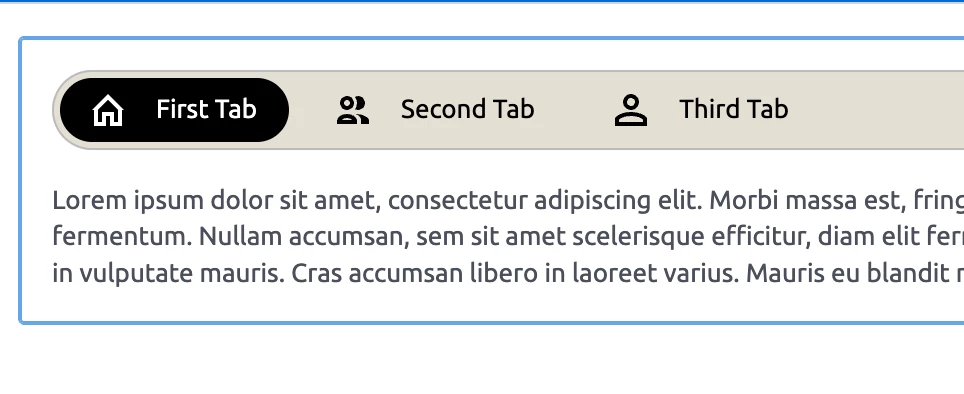
🎨 Expanded Styling with Pill Tabs
You now have more flexibility when designing tabbed interfaces. The Tab Set component supports segmented or “pill-style” tabs, making it easier to create modern, polished navigation patterns that align with your brand.
📄 Documentation: Tab Set
💪 Accessibility updates
- Actions now trigger on full click instead of mouse down, improving predictability and accessibility. (WCAG 2.5.2)
-
Added the ability to reorder table columns using keyboard. You can now reorder columns using SPACE or ENTER, with screen reader instructions guiding you through the interaction. (WCAG 2.5.7)
-
Fixed an issue where go to actions in action sequences were not correctly detected and converted into actionable elements on the page.
⚡ Quality of Life Improvements
-
UI-only fields - Added new model property "Mark model unsaved with field changes" to UI-only fields. This is disabled by default to keep UI-only field changes from showing unsaved changes warnings.
-
Component empty states – Updated text and styling for clearer messaging when no data is present.
-
Page Designer – REST updates: You can now select an array as the path to contents in the Page Designer.
🔗 Full release notes: https://help.nintex.com/en-US/platform/ReleaseNotes/SkuidSFX.htm