Nintex Community Menu Bar
Solved

Increase File Upload Control Size

  • March 9, 2017
  • 1 reply
  • 468 views

Forum|alt.badge.img+1

Hello,


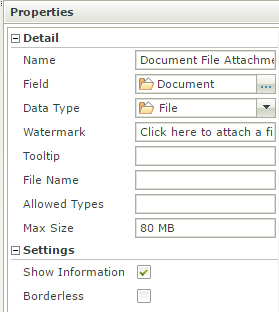
I am trying to increase file upload control maximum size limitation to 80 MB. I have tried following solution provided in one the K2 article but no luck.

Link to K2 Article: http://community.k2.com/t5/K2-blackpearl/How-to-increase-default-file-size-limit-for-File-Attachment/ta-p/92828


I am receiving error as below:

16152i586F917E42DCD308.png

11773i3CB3FE0DEE6B348F.png


Appreciate any help, thank you.


Kishan

 

Best answer by AhmadAbdullah

Dear,


Kindly try increasing the size inside the web config of smartform runtime file.

check the below

http://community.k2.com/t5/K2-blackpearl/How-to-increase-default-file-size-limit-for-File-Attachment/ta-p/92828


Regards

A.Abdullah

1 reply

Forum|alt.badge.img+8

Dear,


Kindly try increasing the size inside the web config of smartform runtime file.

check the below

http://community.k2.com/t5/K2-blackpearl/How-to-increase-default-file-size-limit-for-File-Attachment/ta-p/92828


Regards

A.Abdullah