Nintex Community Menu Bar

Error while trying to create a using PnDin K2 4.7

  • May 20, 2019
  • 11 replies
  • 10 views

Forum|alt.badge.img+3

Hello ,


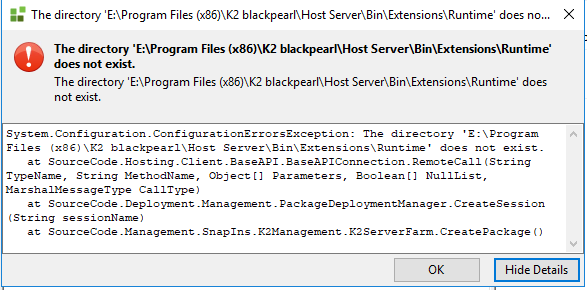
I am getting error while trying to create package using PnD tool .

K2 version : K2 4.7

Error :Attached

Any link highly appreciated .


KindRegards,

Ruchi

11 replies

  • Nintex Employee
  • May 20, 2019

Hey Ruchi,

Upgrade your envronment to the latest Cumulative Update and try again. For K2 4.7 it would be March 2018 CU. After this, you will be able to create your package without issues.

Should this resolve your issue, please can you mark it as such by "Mark as solution" or "Kudo" as it will be helpful to other members of the community who encounter similar issues.

Regards,
Katleho


  • May 20, 2019

Hello  @ruchiaga


May you please supply us with the error attachemennt. It seems you might have probably forgot to attach it since you mentioned it on the post.


Regards,

BesM


Forum|alt.badge.img+3
  • Author
  • May 20, 2019

Please refer the error attached .


Kind Regards,

Ruchi


  • May 20, 2019

Hi  @ruchiaga;


Could you please provide us with more content perhaps “Update history.txt” (so we could recommend the fix if necessary) in the meantime kindly browser into the following link to enable Host server logging (https://help.k2.com/onlinehelp/k2blackpearl/icg/4.7/default.htm#Configure/bp_logging.htm)


Additional:- (https://help.k2.com/onlinehelp/k2blackpearl/icg/4.7/default.htm#TS/BP_Server.htm%3FTocPath%3DTroubleshooting%7C_____12)


Kindly mark such as “Kudo, accepted solution” if you find the above information useful.


Regards;

Widson.


Forum|alt.badge.img+3
  • Author
  • May 20, 2019
Thanks for the quick response .

Could you please let me know where i will find this "Update history.txt" file .

Kind Regards,
ruchi

  • May 20, 2019

Hi;


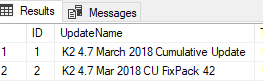
Please could you run the following select statement in your SQL server(against your k2 database) and provide me with the output result:

SELECT * FROM [HostServer].[UpdateHistory]


This select statement will list all the updates that had been installed on your system.

Referencing Documentation:

https://help.k2.com/kb001893


regards;

widson.


Forum|alt.badge.img+3
  • Author
  • May 20, 2019

Hi widson ,


Please refer attached file.


Kind regards,

Ruchi


  • May 21, 2019

Hi;


Could you please navigate into the k2Host Server as follows(see attached):-
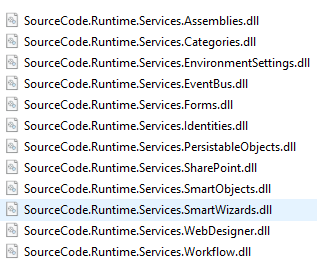
C:Program Files (x86)K2 blackpearlHost ServerBinExternsionsRuntime to check for the tool's existance?

Also try:- the following workarounds...
1. Will you please create a new package from the source environment, then try to deploy it on the destination k2 server.
2. if that doesn't work then please uninstall k2 P&D then install it again. then apply step 1

if the issue exists upon that:- you will have to do it according to this kb:-http://help.k2.com/en/kb000686.aspx


Thank you...


Kind regards;
Widson.


Forum|alt.badge.img+3
  • Author
  • May 21, 2019

Hello Widson ,


Thank you so much for your respose.

I checked the attached dll into the path but it seems it not present there  .


Kindly refer attached .


Kind regards,

Ruchi


  • May 21, 2019

Hi  @ruchiaga;


Thank you for your feedback, as you install your P&D tool, would you mind Marking this as a "Kudo and/or Accepted Solution", to give light(assist) for other community members with similar issues.


Regards;

Widson.


Forum|alt.badge.img+3
  • Author
  • May 22, 2019

Hi Widson,


Does it mean that dll need to have to resolve error  ?


In one of our system its working fine even that dll is missing .


Kind Regards,

Ruchi