Product: Kryon RPA
Product Version: 19.x.x
Components: Kryon Studio
Article Contributors: Kryon CS
When you want to use the advanced commands "Send email message" or "Get email message" with your Gmail account
Prerequisites: Kryon Studio Kryon Console
Steps: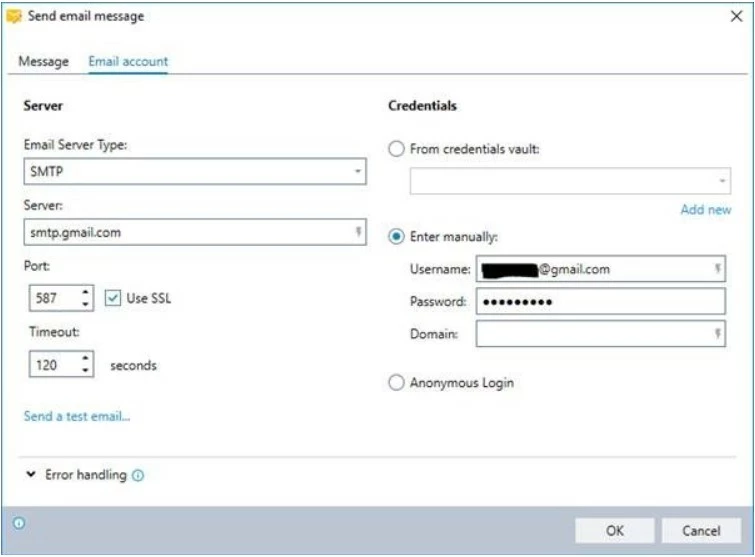
When you want to use the advanced commands "Send email message" or "Get email message" with your Gmail account, here is what you need to do:
-
Email server type: SMTP
-
Server: smtp.gmail.com
-
Port: 587
-
Use SSL: yes
Make sure to follow these configuration on your Gmail account:
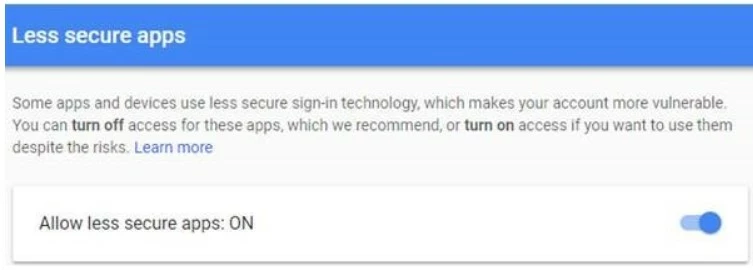
Go to this link (https://myaccount.google.com/lesssecureapps) and set “Allow less secure apps: ON”.
You can read about this step here: (https://support.google.com/accounts/answer/6010255?hl=en)
In case your account is configured to have 2-Steps verification you should sign in using “App Password”. Follow this link to read more and get your password: (https://support.google.com/accounts/answer/185833?hl=en).