



Topic
Solution of issue : Sequelize Connection error in SEQ
Instructions
Issue - During RPA server installation, there are times you could encounter an error with
Sequelize Connection Error (Server requires encryption, set ‘encrypt’ config to true)
as below:
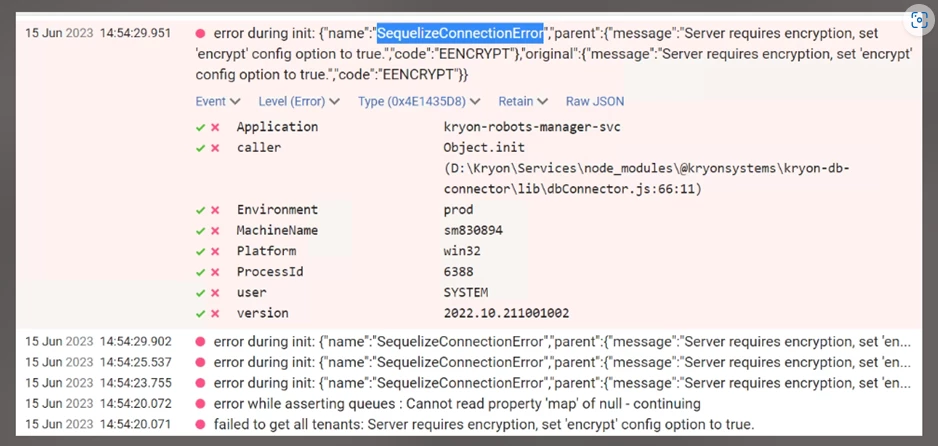
To resolve this, in the config.prod.properties.json file the MSSQL_ENCRYPT line should be set to true as shown below:

For the changes to be applied you need to run configureAll.ps1 script, this can be done with the following powershell command from the folder:
configureAll.ps1 -h “<InstalledDrive>:\Nintex”
However, there are times when the Powershell script doesn’t run due to issues, e.g. server execution policies that cannot be overridden, or the Powershell windows closes on its own when running configureAll.ps1.
Cause :
Possible Powershell restrictions at GP level or organization level.
Solution :
- Use StopAll.bat with administrator privileges to stop all RPA services. This can be found under <Installed Drive>:\Nintex(e.g. E:\Nintex)
- Go to <Installed Drive>:\Nintex\config\prod\general
- Locate db-connector-kryon.json and open with Notepad++
- Change Line 14 (encrypt) from “false” to “true”
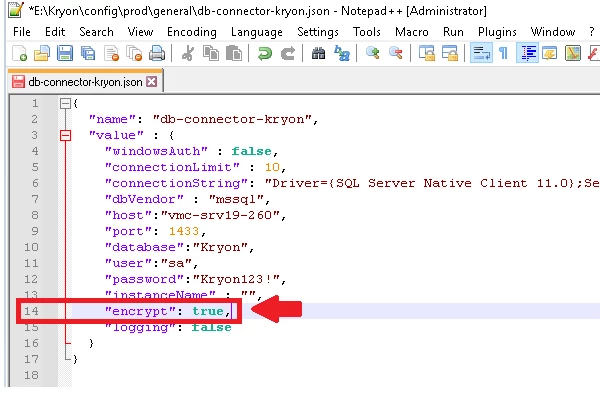
- Save and Close the file.
- Clear Redis cache.
- Restart the RPA services using StartAll.bat with administrator privileges.