



Topic
During the installation of the RPA Robot, the following error is seen in the installation logs:
Failed setting JsonJpath ‘$.MonitoredApplicationSettings.Data[?(@.AppName == 'Kryon Robot’)].UpdateSettings.UpdateServerPaths

The issue is arising from a conflicting registry key for RPA Robot.
Instructions
To resolve the issue, perform the following.
- Open registry editor.
- Go to
HKEY_LOCAL_MACHINE\SOFTWARE\Kryon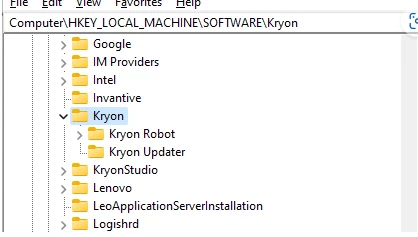
- Delete the entire Kryon folder.
- Save and exit the registry editor.
- Install Kryon Robot.
NOTE: Show extra caution to ensure you are deleting the correct registry key so as not to create unwanted issues thereafter.