Nintex Community Menu Bar

Issues when exporting wizards - system seems stuck - follow these instructions

  • January 25, 2021
  • 7 replies
  • 50 views

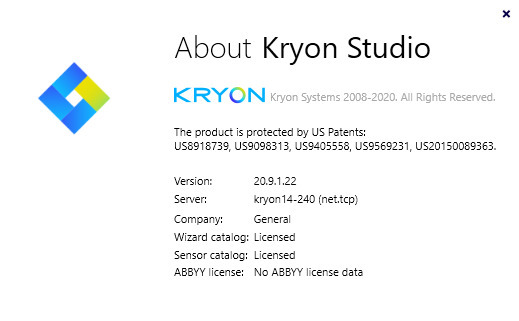
In order to solve this - verify net.tcp communication between Studio and Server.


1) Check Studio: Help -> about and see if - next to server - it says http.

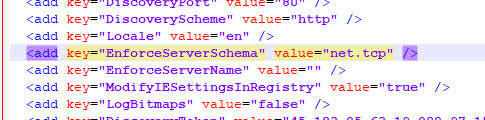
2) If it does, change the following in your config file:

enforceserverschema to net.tcp


25580i93C7EF82BCA481A0.jpg 

25581iA7308BDF9D9D7F4B.jpg 

7 replies

hi

what is this parameter and what is it responsible for?


For example, I have it empty, but there seem to be no problems with export yet, although in the studio this value is indicated


  • August 29, 2022

Hey,

Its still not working for me and Im getting the below error while importing a wizard. Please help!


[Info]: Import file was analyzed.

[Error]: Error analyzing applications and libraries!

[Info]: Analyzing applications and libraries.

[Info]: Reading catalog binary.

[Info]: Preparing data for import.


  • August 29, 2022

@marlon Gobitz​ 

PFB screenshot for your reference. I'd really appreciate if you could suggest a workaround.


Hi- did you press reload, and restart the client?


  • August 29, 2022

@marlon Gobitz​ 

Yes, I did press reload and restart the client.


My article was referring to exporting issues. Now i notice you are having an issue with importing. What version are you working on? Please try to add the applications to the admin before importing the wizard.


  • August 29, 2022

@marlon Gobitz​ 

I'm working on Version 20.3.3.3 and checking if it's a good fit for my organization. I was able to export the wizard and categories successfully but I still have challenges in importing them back.

I have installed the application in the admin account. Could you please help me with the steps so that I can validate it.