Nintex Community Menu Bar

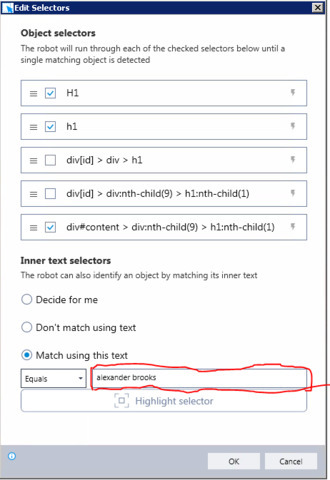
I am using Click on html command and when i tried to use inner text selector and notice that match using this text doesn't haven an option use advanced command in new version.

  • January 10, 2020
  • 4 replies
  • 95 views

25682i70FC01EFDCAF9486.jpg

what do you suggest if we want to match / use variable text ? please advice

thank you.

4 replies

  • August 29, 2022

Hello, this is Darren from the Kryon support team. There currently isn't a way to use variables in the field you have highlighted and there is an open feature request for this in a future version of Kryon RPA. In the meantime, if you need to click on a selector but need a dynamic way of doing so, you can use the Run JavaScript advanced command along with your identified selector e.g.:


document.querySelectorAll("li#mynetwork-nav-item > a:nth-child(1)")[0].click();


Simply replace the part between the quotes ("") with your selector and substitute in any variables if needed using the regular $variable$ syntax. For inner text you can use :contains() as part of the selector.


There are also other ways of traversing and interacting with webpage links. For example:


  1. Using keyboard strokes to highlight UI elements in a browser then press enter/space.
  2. Use JavaScript (window.location.href = '...';) to directly navigate to a page based on links (i.e. in "a" tags) extracted using the Get Webpage HTML advanced command.


I hope this helps,


Regards,

Darren


  • Author
  • August 29, 2022

Hello Darren,

Thank for the quick response.

will use JavaScript


  • August 29, 2022

I forgot to mention that :contains() can actually be used in the selector section of the Click on HTML advanced command itself. In your image you’ll notice that there is a grey bolt to the right which denotes that variables are accepted. Here you can modify the selector shown to include :contains() and put your variable inside of it. This way you won’t need to use Run JavaScript and can use the native Click on HTML as intended


  • Author
  • August 29, 2022

Got you darren.