Nintex Community Menu Bar

Nintex Tasks

  • Oct 18, 2019 12:12 AM UTC
  • 6 replies
  • 67 views
  • Translate All

Forum|alt.badge.img+2

We are using Nintex Online for Office 365. 

I was hoping that someone could point me in the right direction on the best way to restrict access to the items in the task list. There will be sensitive data in some of the tasks so I would like only a subset of users to be able to see some of these tasks. I am aware of the limitations, but I was hoping that someone would have a workaround to apply item level permissions on tasks.




6 replies

Forum|alt.badge.img+14
  • Nintex Employee
  • Oct 18, 2019 5:01 AM UTC

Hi @louise_rh ,


You could create a workflow on the Workflow Task list that runs on item creation. In this workflow you could use the Update Item Permissions action(https://help.nintex.com/en-US/office365/Designer/Actions/O365UpdateItemPermissions.htm) to set the permissions of the task item. Let me know if you have any questions.


Translate

Forum|alt.badge.img+2
  • Author
  • Oct 21, 2019 5:38 AM UTC
Great idea. How did I not think of that :)
Thank you
Translate

Forum|alt.badge.img+2
  • Author
  • Oct 22, 2019 4:05 AM UTC

@leighburke have you achieved this before? I have created a workflow to start when a new item is created but it doesn't trigger when the new task is created.

Translate

Forum|alt.badge.img+14
  • Nintex Employee
  • Oct 22, 2019 4:28 AM UTC

Hi @louise_rh,


Yes, I have a working example on my test site. Did you add any conditions to the start event? Does the workflow run if you trigger it manually on the task?

Translate

Forum|alt.badge.img+2
  • Author
  • Oct 22, 2019 4:43 AM UTC

@leighburke  it runs when I trigger the workflow manually but not when the task is created via the workflow. There are no conditions. Any suggestions?

Translate

Forum|alt.badge.img+14
  • Nintex Employee
  • Oct 22, 2019 6:01 AM UTC

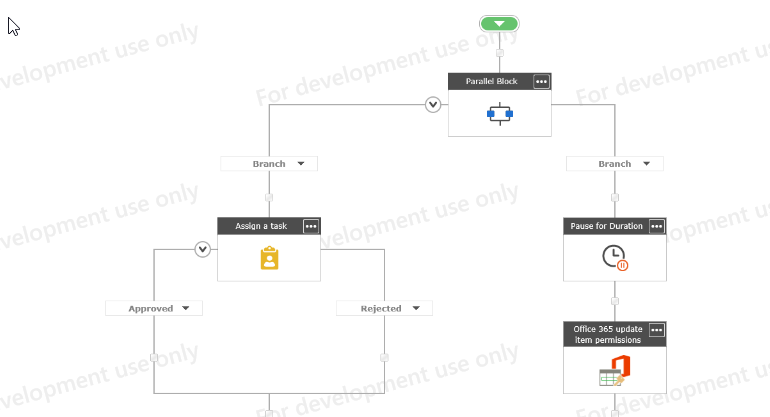
@louise_rh Looks like I was incorrect on this one, mine wasn't working as expected. This is due to a limitation of workflows not being able to trigger other workflows on item creation in SharePoint on o365(https://community.nintex.com/t5/Nintex-for-Office-365/Workflow-not-Starting-on-ItemCreated/td-p/7228/page/2). An option that does work is adding the update item permission in  a parallel block, you will just need to add a small pause and make sure the task has a unique value you can filter by.


Translate