Nintex Community Menu Bar
Question

Nintex Office 365 set drop-down value in a rule

  • Apr 15, 2025 2:14 PM UTC
  • 5 replies
  • 97 views
  • Translate All

Forum|alt.badge.img+4

I am using new responsive forms in SharePoint online. I want to set the value of the dropdown based on another field. There seems to be no way to set the value. Has anyone accomplished this?

5 replies

bamaeric
Nintex Partner
Forum|alt.badge.img+15
  • Nintex Partner
  • Apr 15, 2025 3:36 PM UTC

Check out this video to see if they are what you are trying to accomplish:

How to build cascading drop downs in the New Responsive Designer in Nintex Forms for Office365


Translate

Forum|alt.badge.img+4
  • Author
  • Rookie
  • Apr 15, 2025 3:46 PM UTC

​@bamaeric , Thank you, not exactly what I am looking for. I want to set the selected item of the dropdown in a rule. I will save the video for future reference though. 

Thanks.

Translate

Simon Muntz
Nintex Partner
Forum|alt.badge.img+23
  • Nintex Partner
  • Apr 15, 2025 11:00 PM UTC

Hi ​@jschmidt7,

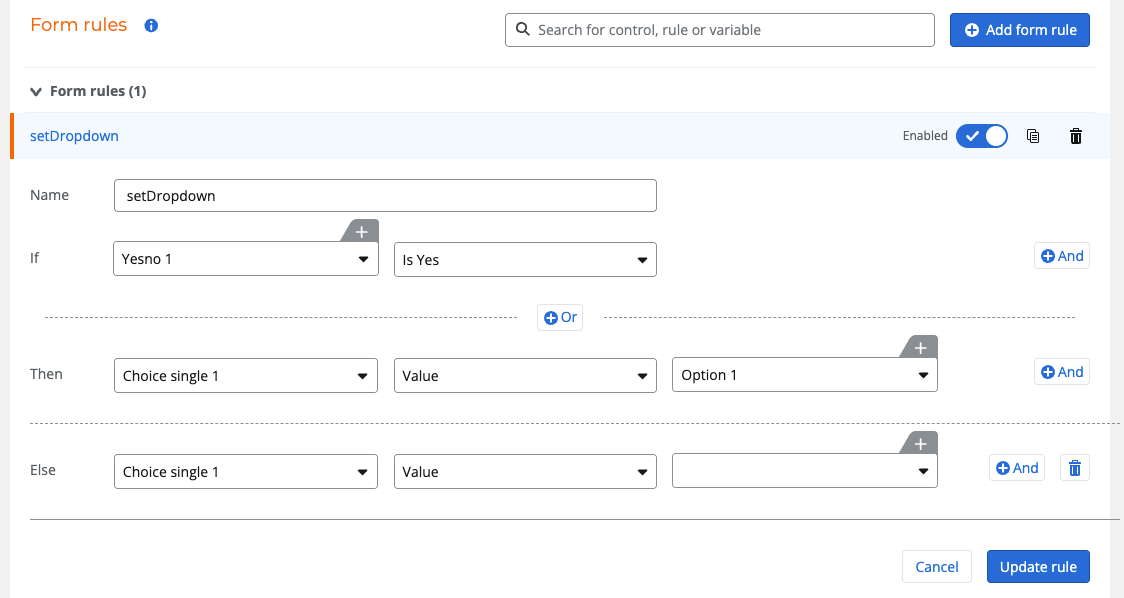
In this example I have a choice single control configured as a dropdown and a yes/no control.
To set the dropdown value when the check box is ticked would look like this.


Translate

Forum|alt.badge.img+4
  • Author
  • Rookie
  • Apr 16, 2025 11:30 AM UTC

This was my mistake; it is actually a List Look up and not a single drop down. 

Translate

Simon Muntz
Nintex Partner
Forum|alt.badge.img+23
  • Nintex Partner
  • Apr 17, 2025 12:58 AM UTC

Hi ​@jschmidt7 

Currently, a rule cannot set the value of a list lookup control.

Translate