
Nintex Community Menu Bar

New Responsive - Can Redirect URL be Dynamic, and can user be Redirected without saving item?

  • Feb 5, 2021 10:50 PM UTC
  • 5 replies
  • 426 views
  • Translate All

Forum|alt.badge.img+5

Hello,

I am Using O365 with a New Responsive form.  I have 2 questions:

1.  When a user clicks "Submit", can I redirect them to a dynamic url?  The url is determined based on the user's input.

2.  Can I redirect a user to another URL without Saving an item in their current list?


Thank you!

5 replies

Forum|alt.badge.img+14
  • Nintex Employee
  • Feb 8, 2021 12:57 AM UTC

@SShaffer2 You can redirect to a url on the cancel button as well but neither cancel or submit currently allows dynamic redirection. You can vote on the feature here(https://nintex.uservoice.com/forums/218293-4-nintex-forms-for-office-365/suggestions/41762182-submit-button-add-insert-to-redirect-to-url).

Translate

Forum|alt.badge.img+5
  • Author
  • Rookie
  • Feb 9, 2021 12:47 AM UTC

Thanks for your response. Since it is not possible to dynamically change the redirect of the Submit/Cancel buttons, is there anyway at all, to send a user to another url?

Ideas:

  1. Add a button? (I don't think this is available in New Responsive, but just double checking)
  2. Logic?
  3. Something else?
Translate

Forum|alt.badge.img+14
  • Nintex Employee
  • Feb 9, 2021 9:20 PM UTC

@SShaffer2 Currently I am not aware on any methods in new responsive forms that will allow dynamic redirection.

Translate

Forum|alt.badge.img+3
  • Nintex Partner
  • Jun 20, 2023 1:13 AM UTC

Thanks for your response. Since it is not possible to dynamically change the redirect of the Submit/Cancel buttons, is there anyway at all, to send a user to another url?


Ideas:


  1. Add a button? (I don't think this is available in New Responsive, but just double checking)
  2. Logic?
  3. Something else?


  4.  


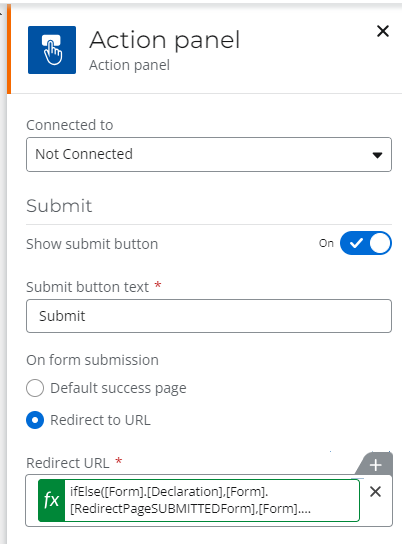
Yes, there is a way.

  1. create a form variable for each redirect link you want
  2. in the “redirect url” button’s configuration, click the “insert” to bring up the formula window.
  3. insert a function to return the appropriate variable url depending on a value on the form.

For example:

ifElse([Form].[Declaration],[Form].[RedirectPageSUBMITTEDForm],[Form].[RedirectPageSAVEDForm])


Translate

Forum|alt.badge.img+2
  • Rookie
  • Jun 27, 2023 9:01 PM UTC

Similarly, you can redirect the user back to from where they came.

Open the form from any view and look at the URL in the browser for the “Source=http….”

the “Source” will be the VIEW or Page they initiated the form to open

So, In the Close/Submit section of the Form use INSERT and add this:  getQueryStringParameter("Source")

Translate