
Nintex Community Menu Bar
Question

How to include a file/file-contents in a Web Service call from NWC

  • January 18, 2023
  • 2 replies
  • 212 views

codenameCata
Forum|alt.badge.img+1

Hi Nintex Community!

I am working on a Nintex workflow where I send an Http POST request to process a file. The prescribed format for this process is as seen in the Message Body of the screenshot below.
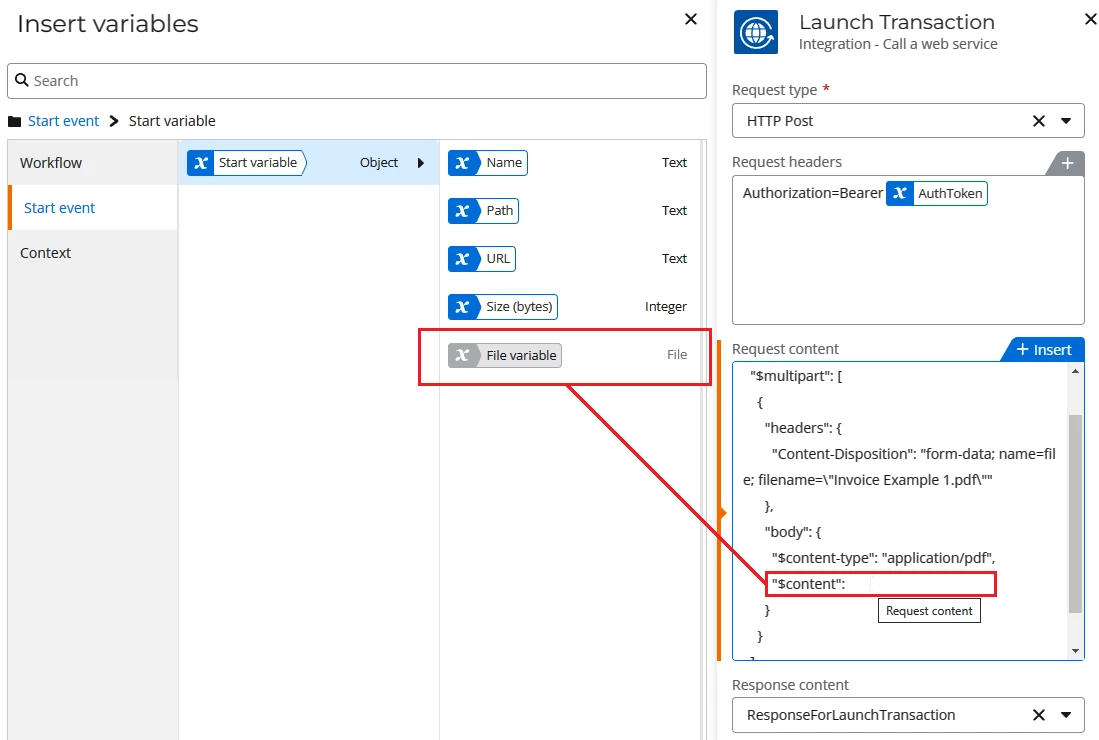
The expectation is that the file contents will be posted as a byte stream/byte array.

The Start event is : OneDrive for Business - New File. When a new file is added to the targeted folder, the workflow kicks off with the variables seen in the screenshot.

The file itself is returned with File datatype. However, I can’t convert or cast it to a string-type variable. Hence, I cannot use it my post request.


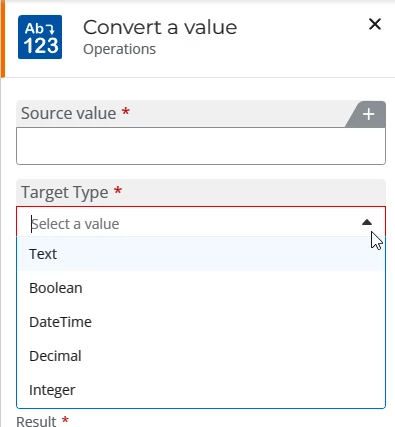
I tried other out-of-the-box commands (e.g. Convert a Value) but the available data types are limited to a pre-defined list and cannot be customised.
 

Can you suggest any ways to send file data as part of a web service request?

2 replies

Forum|alt.badge.img+3
  • Novice
  • November 12, 2024

I have the exact same question. Did you find a solution?


Forum|alt.badge.img+7
  • Apprentice
  • September 17, 2026

Hi All,

even this is an old one and archived, this was the only one I found regarding the topic: “How to send a file to a Web Service”.

I have created a Xtension in our  Nintex Cloud Tenant at <ourTenant>.workflowcloud.com/dashboard/xtensions and used a swagger-json like this:

{
"swagger": "2.0",
"info": {
"title": "Watermark Service",
"version": "1.0.0"
},
"host": "abcwebapp-h5dgdrfshyebdyad.germanywestcentral-01.azurewebsites.net",
"basePath": "/api",
"schemes": ["https"],
"paths": {
"/globalWatermark": {
"post": {
"operationId": "globalWatermark",
"summary": "Upload a PDF file for global watermarking",
"consumes": ["multipart/form-data"],
"produces": ["application/pdf"],
"parameters": [
{
"name": "X-Bearer-Token",
"in": "header",
"description": "AAD access token for this app registration (raw token, no 'Bearer ' prefix needed - the service adds it). Not named 'Authorization' because the Xtension relay collides with that reserved header name.",
"required": true,
"type": "string"
},
{
"name": "file",
"in": "formData",
"description": "PDF file to watermark",
"required": true,
"type": "file"
},
{
"name": "text",
"in": "formData",
"description": "Watermark text to stamp on the PDF. Defaults to 'Confidential' if omitted.",
"required": false,
"type": "string"
},
{
"name": "fileName",
"in": "formData",
"description": "Name for the returned PDF file (used in the Content-Disposition header). Defaults to 'watermarked.pdf' if omitted; a '.pdf' extension is appended automatically if missing.",
"required": false,
"type": "string"
}
],
"responses": {
"200": {
"description": "Watermarking successful",
"schema": {
"type": "file"
}
},
"400": {
"description": "Bad request (no file uploaded, or not a PDF)"
},
"401": {
"description": "Missing or invalid bearer token"
},
"413": {
"description": "File exceeds the 15MB upload limit"
},
"429": {
"description": "Too many requests - rate limited"
},
"500": {
"description": "Server error"
}
}
}
}
}
}


Please note that I am using an Azure App-Registration with a client secret to call my Azure-Web-App. Adjust the value for “host” to your Web-App default domain. This Web App must contain your service which will take the file.
If you upload the json to the Nintex-Xtensions, use ‘None’ as the Auth-Method. Create a nice icon and attach it during the configuration of the Xtension. This icon will then later be shown on the Workflow-Action if you drag it to the Designer. (I used 96*96 pixel).

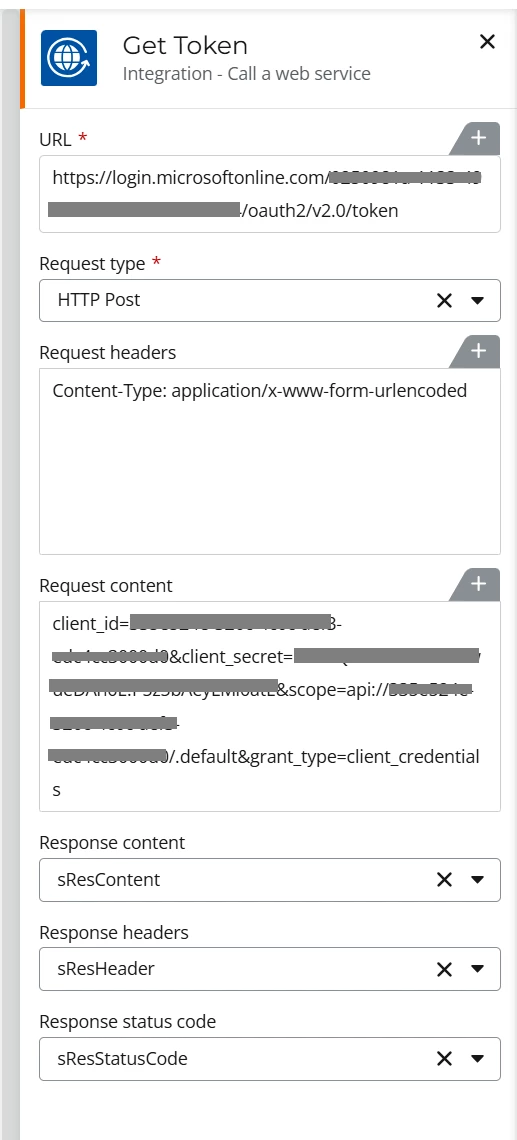
Then in a Workflow obtain a token.

Use your tenant-id in URL.

Use the client_id of your App-Registration.
Use the client_secret of your App-Registration.

Use the Application-ID-URI of you App-Reg, starting with api://


Then use a Query JSON Action to get the Token from the sResContent variable and use this JSONPath expression: $.access_token (Store first result in: sToken)

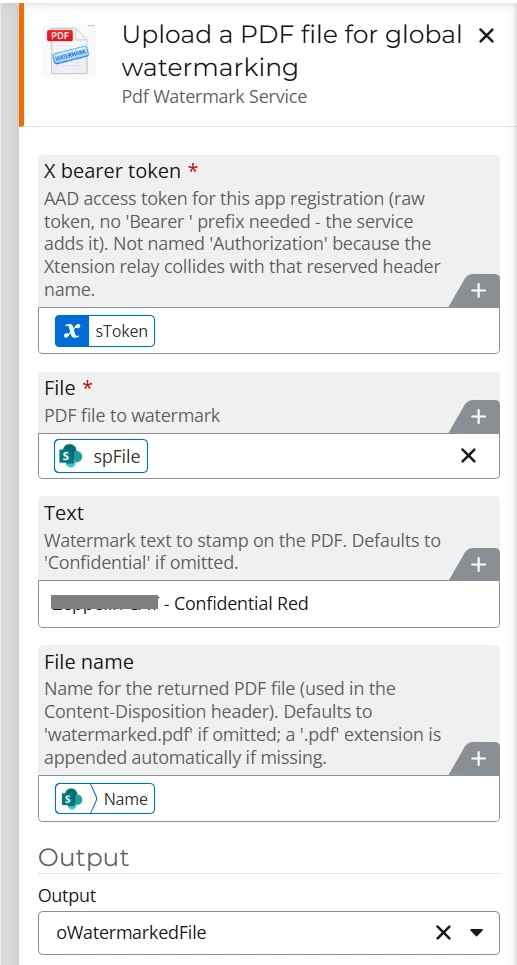
Then configure your new Xtension:
Where spFile is a file object which I got from a “Get a file”-action


Hope that helps others.
Good luck