Nintex Community Menu Bar
Solved

Hide controls when 2 or more selections are selected in choice control (checkboxes)

  • June 8, 2023
  • 6 replies
  • 194 views

Forum|alt.badge.img+2

Hi, 

Is it possible to do this? I have a form with a multi-select choice control using checkboxes and would like to hide some fields if none or one checkbox is checked and show the fields if 2 or more boxes are checked.

Thanks for any help!

Donna

Best answer by bamaeric

Thanks for clarifying. Below is how is accomplish this in the Responsive designer.

1.  Create a form variable by clicking on the Form Variables button in the ribbon.

  • Name = intCount
  • Formula = count(Color Select)   “Color Select” is the Choice control name

2. Create a rule on the control(s) that need to be hidden.

  • Rule name = Hide Controls
  • When = lessThan(_intCount, 2)
  • Then = Hide

3. This should hide the control(s) when zero or one choices are selected.


6 replies

Forum|alt.badge.img+8
  • Nintex Employee
  • June 8, 2023

Hi @dpstear 

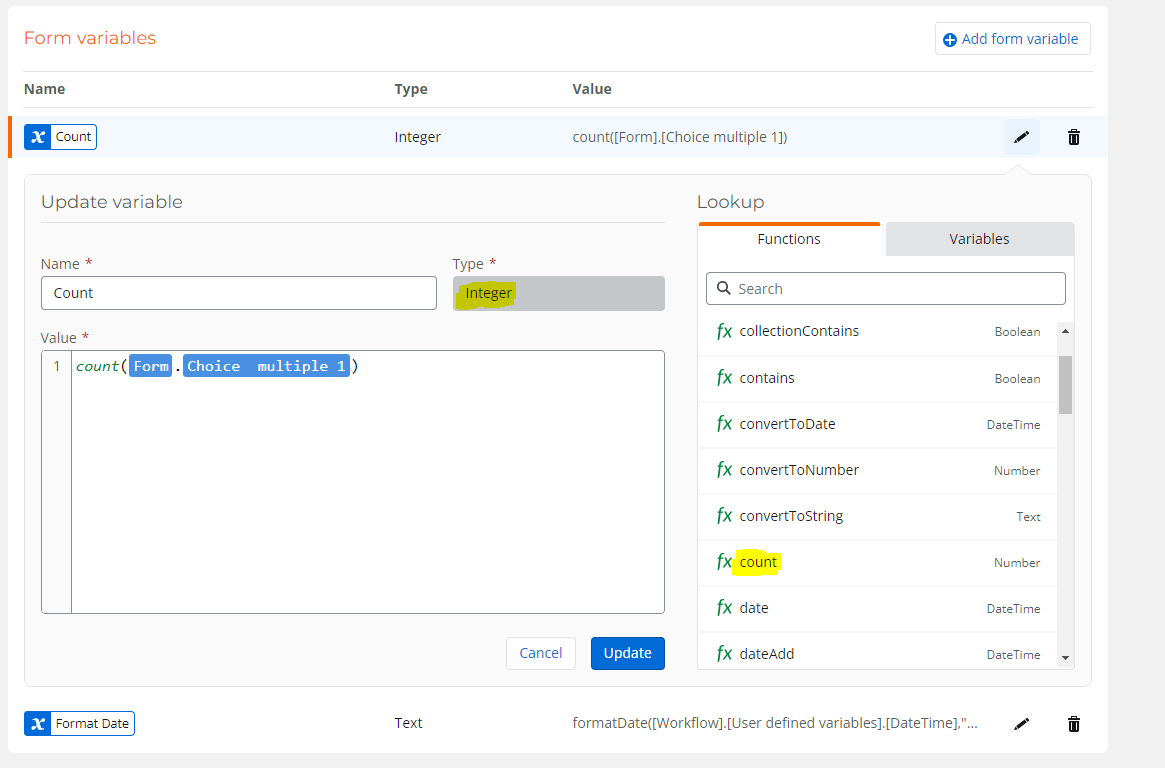
You can create an integer variable on your form and use the count function to count all the checked items in your multiple select control:

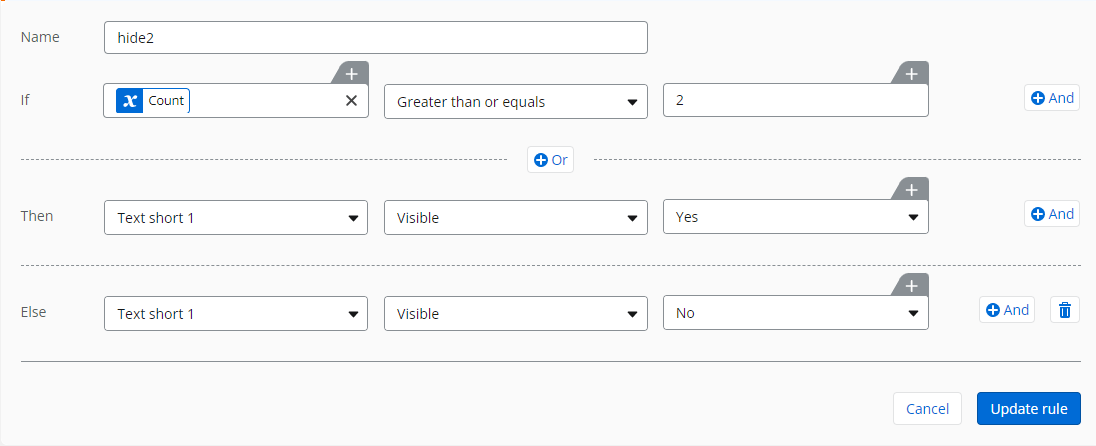
you can then have a rule like this:

or like this:


Forum|alt.badge.img+2
  • Author
  • Rookie
  • June 13, 2023

The rule makes sense to me but I cannot get the variable to work. I am using SharePoint online so my formula builder does not look like that. Any suggestions how to create that formula that way? 

Thanks for all your help!

Donna


bamaeric
Nintex Partner
Forum|alt.badge.img+15
  • Nintex Partner
  • June 13, 2023

The solution from @Prineel_V3 should work if you are using the New Responsive designer.

What forms designer are you using in O365 -- New Responsive, Responsive, or Classic?


Forum|alt.badge.img+2
  • Author
  • Rookie
  • June 13, 2023

Responsive designer. Sorry I forgot to add that.


bamaeric
Nintex Partner
Forum|alt.badge.img+15
  • Nintex Partner
  • Answer
  • June 13, 2023

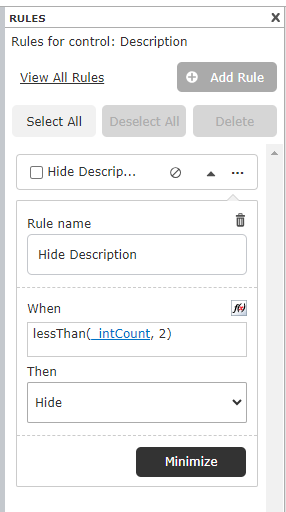
Thanks for clarifying. Below is how is accomplish this in the Responsive designer.

1.  Create a form variable by clicking on the Form Variables button in the ribbon.

  • Name = intCount
  • Formula = count(Color Select)   “Color Select” is the Choice control name

2. Create a rule on the control(s) that need to be hidden.

  • Rule name = Hide Controls
  • When = lessThan(_intCount, 2)
  • Then = Hide

3. This should hide the control(s) when zero or one choices are selected.


Forum|alt.badge.img+2
  • Author
  • Rookie
  • June 13, 2023

That works perfectly! Thank you so much for your help.