Nintex Community Menu Bar
Solved

Created new responsive form but in Library there is no option to access the newly published form?

  • August 26, 2019
  • 4 replies
  • 91 views
  • Translate All

Forum|alt.badge.img+6

I decided to rebuild my forms and workflows on a library rather than a list (if there are issues with that let me know), but in doing so I noticed the new NEW responsive forms were out so I gave it a whirl....


I published the new form and when I go back to the library I see an option to add all kinds of documents EXCEPT the published form.  Is there something I am missing? 


Note: New Responsive forms do work on a list.

Best answer by Simon Muntz

Hi,
Unfortunatley this is how Document libraries work.
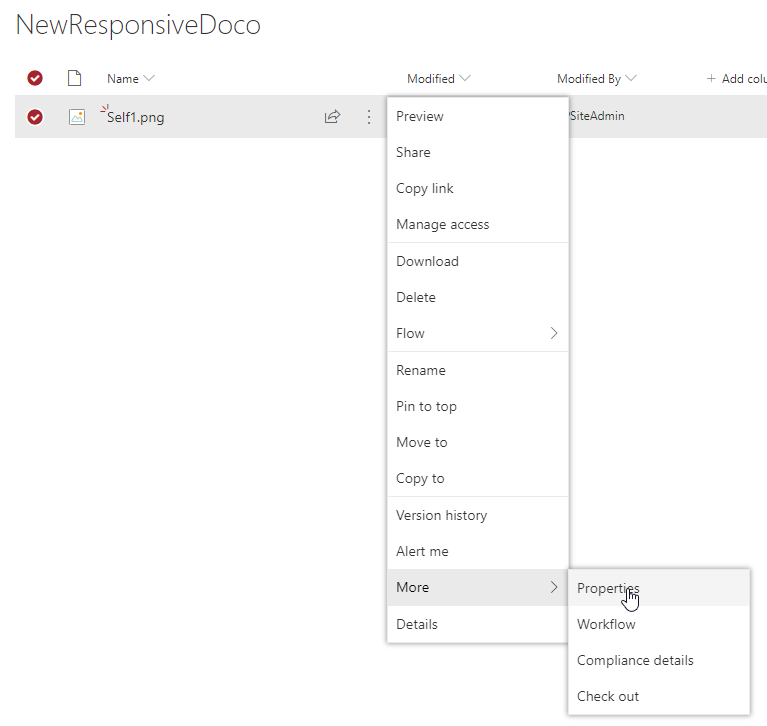
You need to upload a document first and then when editing the properties a form can be used.
View original

4 replies

Simon Muntz
Nintex Partner
Forum|alt.badge.img+23

Hi,


If you navigate to the item properties do you see the form then?


Translate

Forum|alt.badge.img+6
  • Author
  • August 28, 2019

Yes, is there a way to use the form like I would in the list? Just go straight to the form?  Like maybe generate a URL somehow for the form that creates a new item on this list from filling it out?

Translate

Simon Muntz
Nintex Partner
Forum|alt.badge.img+23
  • Nintex Partner
  • Answer
  • August 29, 2019
Hi,
Unfortunatley this is how Document libraries work.
You need to upload a document first and then when editing the properties a form can be used.
Translate

lireland
Forum|alt.badge.img+1
  • Rookie
  • April 28, 2023
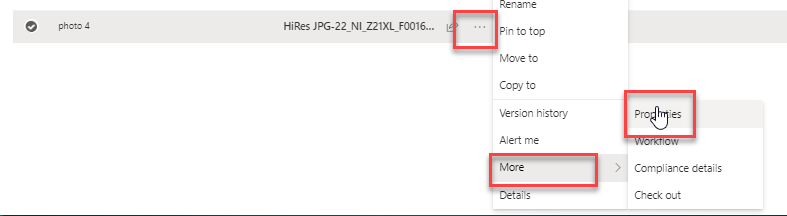
  1. In the Library, select an item and navigate to properties


  1. You have to click Edit to make the form editable


  1. Capture your browser's URL


Translate