Nintex Community Menu Bar
Solved

Can't access workflow status column in Nintex Forms

  • Oct 2, 2019 5:34 PM UTC
  • 4 replies
  • 128 views
  • Translate All

Hi - I created a form from a list, then I created a site workflow that sets the workflow status.  The column appears in my SP list, however I cannot access the control in Forms.  I have tried deleting the form and re-importing it, but that has not worked.  Any suggestions?


List Column:
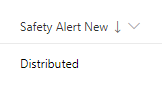
4851iA3D26BF3BD684E8D.png


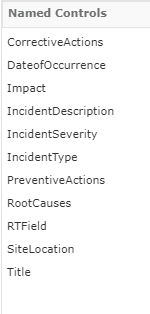
Named Controls in Forms:

4852iD200FD91A6CC480B.png


Best answer by Simon Muntz

Yes I just tested and got the same result.

What did work was if I used a Calculated value control with a Lookup() runtime function. The Workflow Status was displayed in the form.
View original

4 replies

Simon Muntz
Nintex Partner
Forum|alt.badge.img+23
  • Nintex Partner
  • Oct 3, 2019 12:05 AM UTC
Hi,
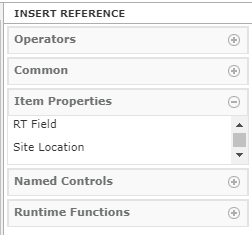
It appears you are looking at the Named Controls. Do you see the column in the Item Properties section or the List Columns section of the right hand tool box?
Translate

  • Author
  • Nintex Partner
  • Oct 3, 2019 12:21 AM UTC

Thank you for responding!  Unfortunately, it's not there.  I added another column after the workflow status column, and I am able to access that column.  Am I unable to see it because it's a hyperlink type column?

Translate

Simon Muntz
Nintex Partner
Forum|alt.badge.img+23
  • Nintex Partner
  • Answer
  • Oct 3, 2019 12:38 AM UTC
Yes I just tested and got the same result.

What did work was if I used a Calculated value control with a Lookup() runtime function. The Workflow Status was displayed in the form.
Translate

  • Author
  • Nintex Partner
  • Oct 3, 2019 2:18 PM UTC

Wow!  Yes, you are correct!  And you cannot select the Column to Filter On out of the named controls.  You must type the name of the field in quotes ("ID").


Thank you for your help!

Translate