
Nintex Community Menu Bar

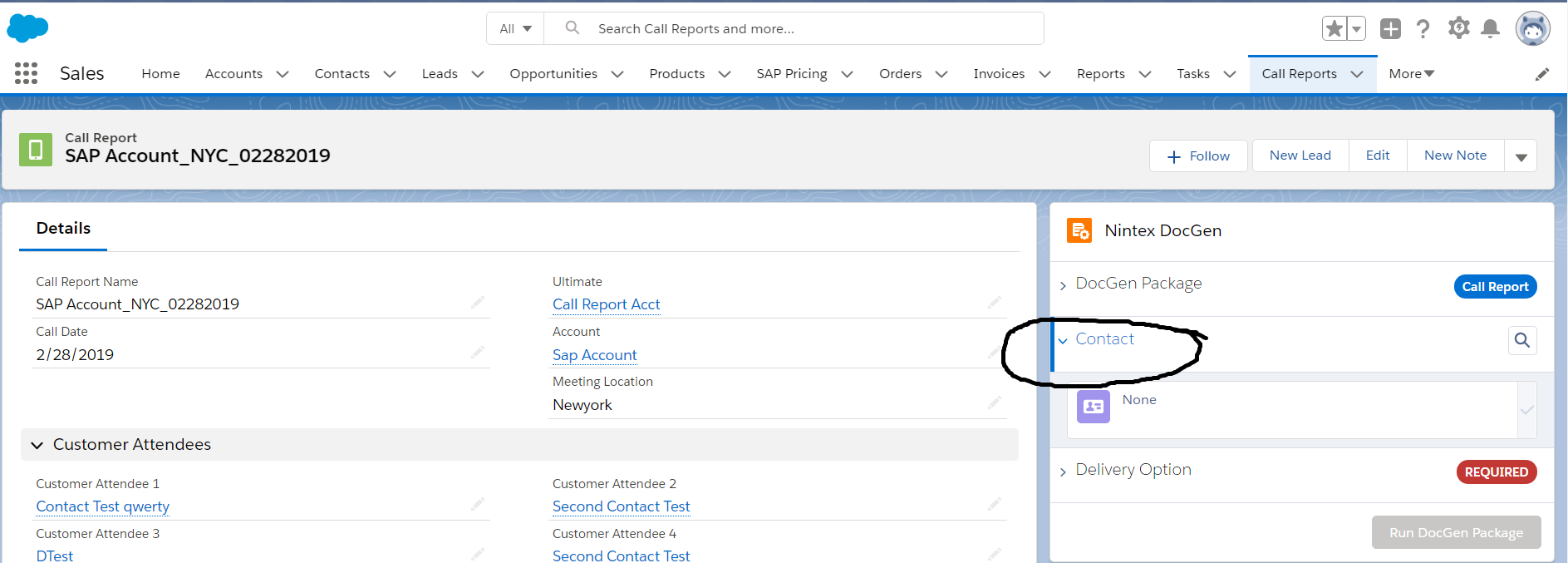
How to delete "Contact selection" in Nintex DocGen component


  • March 1, 2019
  • 6 replies
  • 97 views

6 replies

Forum|alt.badge.img+4
  • Nintex Employee
  • March 1, 2019

Hi DhatriNath,


Unfortutnately at this time, the DocGen Lightning component isn't customizable, so you won't be able to remove the "Contacts" section. We are planning on adding some features to make it more customizable in the future. 


  • Author
  • March 2, 2019

Hi 


  • Author
  • March 2, 2019

I had another doubt regarding Template and output file,
the doubt is how to suppress the blank spaces in output document.
For ex:
<<Product1>>
<<Product2>>
<<Product3>>
we had the values for product1 and product3, In the output document it is showing Product2 as blank space,the requirment is to suppress it and show as
<<Product1>>
<<Product3>>
but I am getting like
<<Product1>>

-------

<<Product3>>


  • June 24, 2021

Hi @katie_chu - is there an update on this functionality?


Forum|alt.badge.img+4
  • Nintex Employee
  • June 24, 2021

Unfortunately no. We haven't rolled anything out for this yet. You can opt to build your own UI if you really need to with Salesforce flow screen as well.


Forum|alt.badge.img

I had another doubt regarding Template and output file,
the doubt is how to suppress the blank spaces in output document.
For ex:
<<Product1>>
<<Product2>>
<<Product3>>
we had the values for product1 and product3, In the output document it is showing Product2 as blank space,the requirment is to suppress it and show as
<<Product1>>
<<Product3>>
but I am getting like
<<Product1>>

-------

<<Product3>>

@nintex , any updates for this one?  I have a similar spacing issue.  Shrinking paragraph breaks helped, but there’s still spacing added when the document is generated with data.

