Nintex Community Menu Bar

[Workspace] Looking for users in other domains

  • August 24, 2007
  • 18 replies
  • 29 views

Forum|alt.badge.img+8

In K2.net 2003, you had to add entries in the different .config files (and especially K2Server.config) to allow the browsing of different domains (e.g. <DataSource Path="LDAP://DC=my,DC=domain,DC=com" NetBiosName="MY" Type="ActiveDirectory" />).


 How can you do that in K2 Blackpearl? I need to give permissions to users from different domains of our organization, and when I want to do that in the Workspace, I can only browse the domain which the server belongs to.

18 replies

Forum|alt.badge.img+3
  • August 24, 2007
My guess would be Management Console > SmartObjects > Services > AD Service.  Then add another service instance.

Forum|alt.badge.img+8
  • Author
  • August 24, 2007

I should have thought about that!


Unfortunately, it did not work. I still cannot browse my domains. But in fact, I don't think the browsing is linked with SmartObjects where I want to do it, as it's only a role assignment in the management console.


(Screen grab: I cannot find any users from a domain that is not the one which the servers belong to)


Roles Management


Forum|alt.badge.img+4
  • Novice
  • August 25, 2007
Have you looked at the configuration files in the install directory?

Forum|alt.badge.img+8
  • Author
  • August 27, 2007

Yes I have. I found only one reference to the concept of datasources as it exists in K2.net 2003. It's in the "K2Server.setup" file, in the "HostServerBin" directory. But adding a new data source had no effect (even after having restarted the server). I think it's quite normal, as it is not a workspace config file.


 Concerning the workspace directory, no file makes reference to my original domain, excepted "Management.xml". However, even if it's close to what I expected (in contains references to the "K2" security domain appearing in my screenshot, and to my AD domain), it seems that it's not the right place to define a new AD search path. If it is, then I must admit that I don't understand how!


Forum|alt.badge.img+8
  • Author
  • September 3, 2007
Argh! My local K2 Technical Specialist has just told me that it's not currently possible to browse multiple domains... An update will fix this later. 😥

Forum|alt.badge.img+9
  • Nintex Partner
  • September 4, 2007
This document might be helpful in helping you add in your additional domains.  Note that manually editing the database is not officially supported but this document should get you by until the official function is built into the interface.  Please remember to backup your databases before doing any edits.  Wink

Forum|alt.badge.img+8
  • Author
  • September 4, 2007
Thank you very much! That was the kind of stuff I was looking for!

Forum|alt.badge.img+5
  • September 13, 2007
On this note I was wondering if anyone knew of an aproximate date for the fix? Also I was wondering if BP will accept NT AuthorityAuthenticated Users into the permissions?

Forum|alt.badge.img+7
  • October 23, 2007
does the fix release yet?

Forum|alt.badge.img+7
  • October 23, 2007

is this KB work?

http://kb.k2workflow.com/articles/kb000182.aspx
KB000182 - How to register labels against multiple domains

But how can I get the GUID of
1) {GUID of ([SecurityLabelID]}
2) {GUID of SecurityProvider for Authentication Services(IAuthenticationProvider)}
3) {GUID of the SecurityProvider for User and Group Listing services (IRoleProvider)}


Forum|alt.badge.img+8
  • Author
  • October 23, 2007

Yes, it works perfectly...


For the different GUID fields, just type "newid()". This function will generate valid GUIDs.


Forum|alt.badge.img+7
  • October 24, 2007

but, say I have 2 domains, DomainA is the root, one child domain called DomainB.


If I installed BlackPearl in DomainB, after following the KB, I can have one more Security Label to get users from other domain, but [BlackPearl WorkSpace]-->Security-->Workflow Permissions, click Add and no such Security label.


Forum|alt.badge.img+8
  • Author
  • October 24, 2007

I had the same problem the first time I tried. I didn't stop IIS nor the K2 Blackpearl server.


I made a second attempt (after having cleaned what I did in the database) with both IIS and workflow server stopped and everything worked fine after I restarted those services.


Forum|alt.badge.img+7
  • October 24, 2007

But the default security label was still K2(The default one for DomainB). And the only WorkSpace/Management permission are all having DomainB/ServiceAcct only. If I change the default Security Label to NewLabel(which is for DomainA), then I restart all the K2 service, I then can search user from DomainA(Management Permission has no Security Label to be allow you to select). I then click Add, the original DomainB/ServiceAcct is having no permission to save it(Because the FQDN for the user was K2:DomainB/ServiceAcct, now change into NewLabel:DomainB/ServiceAcct). Action cancelled.


Forum|alt.badge.img+8
  • Author
  • October 24, 2007

I don't understand...


In the workspace, under Management --> Management Console --> Administration --> Roles --> Add Role Item, can you see all your security labels? Default AND added ones? If yes, it should look like on the screenshot below, right? (in my case, I've added the K2FR security label, setting it as the default one, removing this attribute from the original K2 label)


Workspace


Forum|alt.badge.img+7
  • October 25, 2007

Nicolas, Thanks a lot. I could find the dropdownlist and get the added value after following the KB.


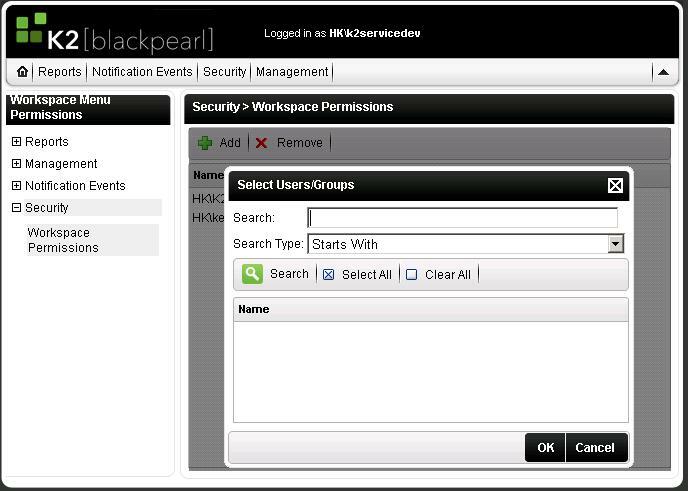
But I mean under "Security Tab"-->Security-->Workspace Permissions-->Add, the Select Users/Groups Dialog does not allow me to search from difference domain but onyl the default Security Lab's domain only.


13564iF4E5F20675D576E4.jpg

Forum|alt.badge.img+8
  • Author
  • October 25, 2007

Oh sorry! You're perfectly right! I didn't notice that...


I suppose another table has to be explored in the database. I hope there will be a new KB article about that soon!


Mr K2, if you read us...


Forum|alt.badge.img+7
  • December 5, 2007
Will it be solved in the next hotfix?