Nintex Community Menu Bar

Worklist via SmartObjects

  • August 31, 2007
  • 2 replies
  • 13 views

Forum|alt.badge.img+8

Are/can worklists be exposed via smartobjects? With the ability to start processes through ADO.NET acting on a SmartObject it would be nice to be able to extend that functionality to worklists to leverage .NET data grid controls to create your own custom worklists. 


Any ideas or suggestions?

2 replies

Forum|alt.badge.img+9
  • March 11, 2014

Hi,


The Worklist Service Broker (blackmarket and not supported) enables the retrieval of user(s) work list items so that you can quickly create custom work lists and reports that incorporate standard work list data with line of business data within the same view:


http://community.k2.com/t5/K2-blackpearl/Worklist-Service-Broker/ba-p/889


Forum|alt.badge.img+3
  • March 11, 2014

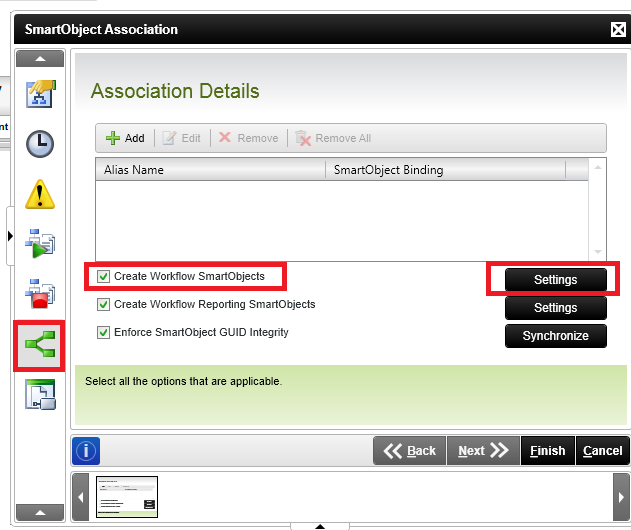
There is also another option. When you deploy a process you can also select an option to create a Smart Object for that process that allows you to Start the the process using a Smart Object.


Right click the Canvas,

Select 'Properties'

Check the box 'Create Workflow SmartObjects'

You can aslo go into Settings and select advanced objects.


When next it is deployed you can then go to the workflows Smart Objects.


The statements and opinions made in my postings are my own, and do not reflect the opinions of SourceCode Technology Holdings, Inc. or its subsidiaries. All information is provided as is with no warranties, express or implied, and grants no rights or licenses.


13491i6EFE3687A91700A7.png