Nintex Community Menu Bar

workflow with different management levels

  • September 6, 2019
  • 4 replies
  • 21 views

Forum|alt.badge.img+1

Hello Forum,


i'm trying to build a budget approval workflow which shall loop till a specifc management level is reached. I try it with the flexis task. Unfortunately i cannot find a way to loop to the manager of the manager or to the approval manager. Does anybody knows a way to build the worklfow with this different management levels?


thanks in advance

Carsten

4 replies

Forum|alt.badge.img+7
  • Nintex Partner
  • September 8, 2019

Do you want to have approvals of each management level or do you want to traverse all the way up to "top management level" and have an approval on this level?


If the latter would be the case I would create a loop and query the manager starting with the workflow initiator and the the manager of the manager until there is no manager available. The you could exit the loop and assign a task to the last manager you found.


Forum|alt.badge.img+1
  • Author
  • September 12, 2019

Thank you eiben for the answer.

In my case, i want to have an approval of each management level. My Service Hotline told us to choose the Property Manager, but i cannot find this option. In my workflow the loop stops after the manager of the initiator got the task.


Forum|alt.badge.img+7
  • Nintex Partner
  • September 16, 2019

Hi,


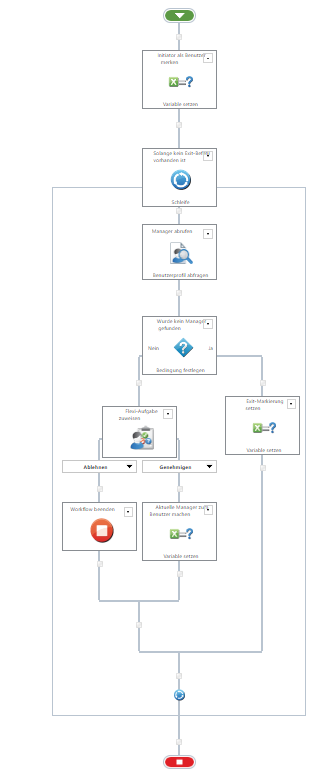
I think I would do the following:

  1. store the initiator in a variable (for eg "persCurrentPerson")
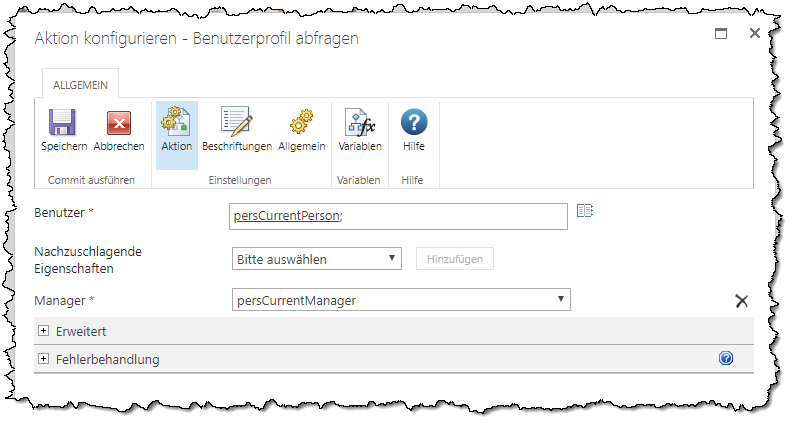
  2. query the user-profile for the Manager of this variable
  3. if a Manager was found, assign a task to this Manager
  4. if the task was approved, then set the Manager to the persCurrentPerson variable, otherwise you could end the workflow or do some other steps
  5. repeat from step 2 unless there was not previously a Manager found

As a workflow this could look like this:

4551iA1D0B32C32A905D4.png

To get the Manager I used the query userprofile action (assuming Nintex Workflow Enterprise):

4552i600546731BECFF39.png

If you don't have the Enterprise Edition of Nintex Workflow you could call the UserProfile-Webservice of SharePoint yourself.

BTW: don't be scared, because of the SharePoint 2013 screenshots, that's the only system I could get a hold of that quickly. This works in SharePoint 2016/2019 the same.


Forum|alt.badge.img+1
  • Author
  • September 17, 2019

Hello Eiben,


this is exactly the solution i was looking for. Thank you for your support.


Carsten